
10-152-312 - Object-Oriented Programming 2
4.4 Zoo Assignment
Create a custom extension method
- Extension methods enable you to "add" methods or functionality to an existing class without modifying the class itself and are written like regular methods with the addition of the "this" keyword in the parameter list before the type that you want to modify
- Modify the Flatten method of the ListUtil class so that it is an extension method of the IEnumerable<string> type
- The modified method should look like the following code:
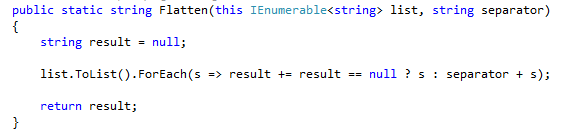
- This method is called from the WriteHelpDetail method in the ConsoleUtil class
- Change how the Flatten method is called so that instead of passing in an IEnumerable<string>, the method is called on the IEnumerable<string>
- The modified method call should look like the following code:

- Run the console application
- Run the "help behavior" command
- The Usage section of the console's output should still be a list of strings separated by spaces
Write another extension method
- Make the Flatten method of the EnumUtil class an extension method of the Enum type
- The method is called from the ShowHelpDetail method in the ConsoleHelper class
- Modify how the Flatten method is called so that it is called on the Enum rather than passing the Enum into it
- Run the console application
- Run the "help behavior" command
- The Parameters section of the console's output should still contain a list of behavior types separated by commas and spaces
Move existing "query" methods from Zoo to extensions
- Create a static class in the Zoos project called ZooQueryExtensions
- Move the following methods from the Zoo class to the ZooQueryExtensions class and make them extension methods:
- FindAnimal
- FindEmployee
- FindGuest
- GetAnimals
Apply anonymous types to 4.3 query methods to configure display grid
- Modify these existing button clicks in the query window to use extension methods that call LINQ queries and return an IEnumerable<object>
- Get all dingoes
- Use an anonymous type to bring back only these relevant properties:
- Name
- Age
- Weight
- Name of the Type
- Get first pregnant animal
- Instead of getting the first pregnant animal, get all pregnant animals
- Use an anonymous type to bring back only these relevant properties:
- Name of the Type
- Name
- IsPregnant
- Get first young guest
- Instead of getting the first young guest, get all young guests
- Use an anonymous type to bring back only these relevant properties:
- Name
- Age
- Run the WPF application
- Create a few dingoes, pregnant animals and guests (at least one of whom is younger than 10)
- Open the query window
- Click each of the modified buttons
- Ensure that only the appropriate properties are shown (e.g. getting young guests should show only their name and age)
Write a simple LINQ query using an anonymous type
- Create a Zoo extension method in the ZooQueryExtensions class called GetUnconsciousAnimals that returns an IEnumerable<object>
- In method, write a LINQ query that returns all of the unconscious animals in the zoo
- Get the animals in the zoo
- Test each animal's hunger state to see if it matches the HungerState.Unconscious enum
- Select the animal's Name and HungerState
- Add a button to the query window whose click event handler sets the data grid's ItemsSource to the result of GetUnconsciousAnimals method
- Run the WPF application
- Add a few animals
- Open the query window
- Click the get unconscious animals button
- The data grid should show just the name and hunger state of all unconscious animals
Write more LINQ queries using anonymous types
- Add the following Zoo extension methods to the ZooQueryExtensions class
- GetFlyingAnimals
- Write a LINQ query that gets all animals whose move behavior is flying
- Select the animals' name and the name of it's move behavior Type
- GetGuestsOrderedByAge
- Write a LINQ query that gets all guests and orders them by their age
- Select the guests' name and age
- GetTotalMoneyBalanceByWalletColor
- Write a LINQ query that groups guests by wallet color
- Select the wallet color (use the group's Key) and the total money balance of the wallet color group
- GetAverageWeightByAnimalType
- Write a LINQ query that groups animals by their type
- Select the animal type (use the group's Key) and the average weight of the animal type group
- Add buttons to the query window that call each of the four Zoo extension methods and set the results to the data grid's ItemsSource
- Run the WPF application
- Add a few animals and guests
- Open the query window
- Click each of the buttons to call the extension methods
- Ensure that each button shows only the appropriate properties and animals/guests/anonymous types that match the LINQ query (e.g. calling GetFlyingAnimals should only show the name and move behavior type of all animals that fly)
Add parameters to the console's query command
- Add (or modify) the following parameters to the "query animal" command:
- averageweight - get the average weight by animal type and write each to the console
- dingoes - get all dingoes in the zoo and write each to the console
- pregnant - get all pregnant animals in the zoo and write each to the console
- flying - get all flying animals in the zoo and write each to the console
- unconscious - get all unconscious animals in the zoo and write each to the console
- Add (or modify) the following parameters to the "query guest" command:
- children - get all young guests in the zoo and write each to the console
- moneybalance - get the total money balance by wallet color and write each to the console
- byage - get all guests in the zoo, ordered by age, and write each to the console
- Run the console application
- Create at least 5 animals of 2 different types and make at least one fly
- Test each animal query to ensure that it writes out the correct properties of the correct animals
- Create at least 5 guests with 2 different wallet colors and make at least 2 be younger than 10
- Test each guest query to ensure that it writes out the correct properties of the correct guests
Grading and Submission
- Build/compile your program
- Debug/test your program against the following rubric:

- Make your code StyleCop-compliant
- Close your Visual Studio solution
- Compress your Visual Studio solution to a zip file
- Submit the zip file via Blackboard