
Replace anonymous functions in zoo Find/Get methods with lambda expressions
- Replace all anonymous functions with lambda expressions in the following methods
- FindAnimal (all overloads)
- FindEmployee
- FindGuest
- GetAnimals
Replace a foreach loop with a simple lambda expression
- In the Cage's ToString method, replace the existing foreach loop with a lambda expression in the ForEach extension method
- The ToString method should contain this code:

Replace more foreach loops with simple lambda expressions
- Replace the foreach loops in the following method with a lambda expression inside of the ForEach extension method:
- Zoo.OnDeserialized
Replace an accumulator loop with an extension method
- Many foreach loops can be replaced with the ForEach extension method, but some loops should be replaced with other extension methods, depending upon what the loop is intended to do
- Look at the foreach loop inside the Zoo's TotalAnimalWeight property
- The loop adds each animal's weight to a variable holding a running total - in other words, it is summing the animals' weights
- Replace the foreach loop with the Sum extension method and a lambda expression
Refactor the AverageAnimalWeight to use an extension method
- In the zoo's AverageAnimalWeight property, instead of dividing the total animal weight by the number of animals, use the Average extension method with a lambda expression
Create a query window to test lambda expressions
- Create a new window called QueryWindow
- Pass the zoo into the window's constructor and store it in a field
- Add a label to the window
- Add a button called totalAnimalWeightButton
- Add a click event handler to the button
- The event handler should call the TotalAnimalWeight property and put the result into the label's content
- Add a button called totalAnimalWeightButton
- Add a click event handler
- The handler should call the AverageAnimalWeight property and put the result into the label's content
- Add a button called animalCountButton
- Add a click event handler
- The handler should call the AnimalCount property and put the result into the label's content
- Add a button called guestCountButton
- Add a click event handler
- The handler should call the GuestCount property and put the result into the label's content
- Add a button to the MainWindow that launches the QueryWindow
- Run the WPF application
- Create three animals
- The first has a weight of 10
- The second has a weight of 15
- The third has a weight of 18.5
- Create two guests
- Launch the QueryWindow
- Click each of the four buttons
- The total animal weight should be 43.5
- The average animal weight should be 14.5
- The animal count should be 3
- The guest count should be 2
Create a query command in the console application
- Add a new command to the console application called "query"
- The command takes two parameters
- The first parameter is "animal"
- The second parameter is "totalweight"
- The command should call the zoo's TotalAnimalWeight property and output the result to the console
- Run the console application
- Add two animals
- The first has a weight of 10
- The second has a weight of 12
- Run the "query animal totalweight" command
- The console should output a total animal weight of 22
Add more queries to the console query command
- Add more parameter options to the console's query command
- The command's first parameter can be either "animal" or "guest"
- For animals, the command's second parameter can be "totalweight", "averageweight", or "count"
- "totalweight" returns the total weight of all animals in the zoo
- "averageweight" returns the average weight of all animals in the zoo
- "count" returns the number of animals in the zoo
- For guests, the command's second parameter is "count"
- "count" returns the number of guests in the zoo
- Add the "query" command's description and instructions to the "help" command
- Run the console application
- Add two animals
- The first has a weight of 15
- The second has a weight of 13
- Add two guests
- Run the "query animal averageweight" command
- The console should output the number 14
- Run the "query animal count" command
- The console should output the number 2
- Run the "query guest count" command
- The console should output the number 2
Create a list on a collection in order to use the ForEach extension method
- The ForEach extension method is only available on collections of type List, which means that other collection types, such as Enumerables, must be turned into Lists before the ForEach method can be used on them
- In the ListUtil's Flatten method, change the IEnumerable parameter to be of type IEnumerable<string>
- Inside the method, replace the foreach loop with a lambda expression by first applying the ToList method and then the ForEach method
- The Flatten method should contain this code:

Use the ToList extension method to replace more foreach loops
- Replace foreach loops with the ToList and ForEach extension methods in the following methods:
- CageWindow.DrawAllItems
- MainWindow.CloseAllCageWindows (turn the dictionary's Values into a list)
- ConsoleUtil.WriteHelpDetail
Use the Cast method to define a type in order to use a lambda expression
- Untyped lambda expressions can only be used if the type of objects in a collection is known. If the objects' type is unknown, the Cast method can be used to cast all objects in a collection to a known type.
- Replace the contents of EnumUtil's Flatten method with the following code:
- Replace the existing loop in the Zoo constructor that creates the cages with this following code:
- Replace the existing loop in the CageWindow's window_Closed event handler with the ForEach extension method and a lambda expression
- First Cast the Children collection as type Viewbox
- Then use the ToList method
- Then use the ForEach method with a lambda expression


Use the Find extension method to replace control-break loops
- Not all foreach loops should be replaced with the ForEach extension method, as we saw with the Sum extension method replacing an accumulator loop. Another example of this is the Find extension method replacing control-break loops, which loop through a collection, testing each item for a certain condition. The loop breaks as soon as the first item matching the condition is found.
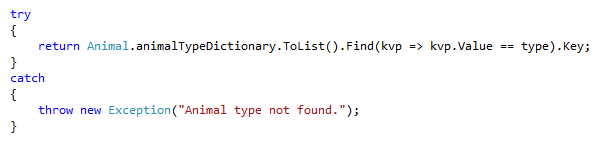
- Replace the loop in Animal's ConvertTypeToAnimalType method with the Find extension method
- Use the ToList method on the dictionary
- Find the Value that matches the passed-in type
- Return the Key
- Using extension methods here can simplify the method significantly. The entire method should now contain the following:
Use the Find extension method to replace another control-break loop
- Replace the existing foreach loop in the CageWindow's Remove method with the Find extension method
- First Cast the Children collection as type Viewbox
- Then use the ToList method
- Then use the Find method to return the Viewbox whose Tag is the passed-in cageable
- If the found Viewbox is not null, remove it from the grid's Children collection
Pass predicates to zoo's Find methods
- Create a new FindAnimal method on the zoo that takes an animal predicate as a parameter
- Pass the predicate in to the Find method
- Return the resulting animal
- Modify the FindGuest method on the zoo that takes a guest predicate as a parameter
- Pass the predicate in to the Find method
- Return the resulting guest
- Modify the FindEmployee method on the zoo that takes a employee predicate as a parameter
- Pass the predicate in to the Find method
- Return the resulting employee
- Call the new/modified methods in each place where the existing methods are called, passing in the appropriate predicate
- Remove the overloaded versions of the FindAnimal method that do not take a predicate
- Run the console application
- Set a breakpoint in the FindAnimal method that takes a predicate
- Add a few animals
- Call the show animal command
- After the breakpoint is hit, step through the code to ensure that the method returns the correct animal
Add a data grid to the query window
- Add a data grid control to the query window
- Add the following buttons to the query window
- Find dingoes
- Set the data grid's ItemsSource to a collection of all dingoes in the zoo
- Find the first pregnant animal
- Set the data grid's ItemsSource to a collection containing the first pregnant animal found in the zoo
- Find the first young guest
- Set the data grid's ItemsSource to a collection containing the first guest who is 10 years old or younger found in the zoo
- Run the WPF application
- Add a guest who is 9 years old and a guest who is 25 years old
- Add two dingoes, one of them pregnant
- Launch the query window
- Click the Find dingoes button - both dingoes should appear in the data grid
- Click the Find pregnant animals button - only the pregnant dingo should appear in the data grid
- Click the Find young guests button - only the guest who is 9 should appear in the data grid
Replace anonymous methods with typed and untyped lambda expressions
- In the MainWindow's AttachDelegates method, replace the code that attaches an anonymous method to the zoo's OnRemoveAnimal delegate with the following code:
- That code uses a lambda expression with a typed parameter to replace the anonymous method. But lambda expressions can infer parameter types, so the explicit typing can be removed, as in the following code:
- Follow the same steps to replace the anonymous method attached to the zoo's OnRemoveGuest delegate with a lambda expression
- Run the WPF application
- Add at least one guest and one animal
- Remove the guest and the animal
- Ensure that all fuctionality works as it did before


Replace anonymous methods with lambda expressions with a body
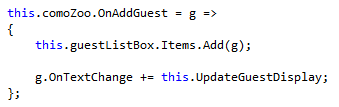
- Lambda expressions that contain more than one line of code need brackets surrounding its body
- In the MainWindow's AttachDelegates method, replace the code that attaches an anonymous method to the zoo's OnAddGuest delegate with the following code:
- Follow the same steps to replace the anonymous method attached to the zoo's OnAddAnimal delegate with a lambda expression
- Run the WPF application
- Add at least one guest and one animal
- Ensure that all functionality works as it did before
Replace anonymous methods with lambda expressions with multiple parameters
- Lambda expressions that take two or more parameters require parentheses around the parameters, in contrast to those that take only one parameter
- In the MainWindow's AttachDelegates method, replace the anonymous method attached to the zoo's OnBirthingRoomTemperatureChanged delegate with a lambda expression that takes two parameters - a birthing room and a double
- The lambda expression should look like the following code:
- Run the WPF application
- Change the birthing room temperature
- Ensure that all functionality works as it did before

Replace anonymous methods with lambda expressions that take no parameters
- Lambda expressions that take no parameters also require parentheses, like those that take two or more
- In the Zoo's AddGuest method, replace the anonymous method attached to the guest's GetVendingMachine delegate with a lambda expression that takes no parameters
- The lambda expression should look like the following code:
- Run the WPF application
- Add at least one animal and one guest
- Have the guest feed the animal
- Ensure that all functionality works as it did before

Replace other anonymous methods with lambda expressions
- Replace the anonymous methods attached to the following delegates and event handlers with lambda expressions
- moveTimer.Elapsed in Animal.CreateTimers
- hungerTimer.Elapsed in Animal.CreateTimers
- feedTimer.Elapsed in Guest.CreateTimers
- moneyPocket.OnBalanceChange in Wallet constructor
- Wallet.OnBalanceChange in Guest constructor
- CheckingAccount.OnBalanceChange in Guest constructor
- adoptedAnimal.OnHunger in Guest.AdoptedAnimal setter
- zoo.OnBirthingRoomTemperatureChange in ConsoleHelper.AttachDelegates
- cageable.OnImageUpdate in Cage.Add
- b168.OnTemperatureChange in Zoo constructor
- cage.OnImageUpdate in CageWindow constructor
- Dispatcher.Invoke in CageWindow constructor
- Dispatcher.Invoke in MainWindow.UpdateAnimalDisplay
- Dispatcher.Invoke in MainWindow.UpdateGuestDisplay
- Run the WPF application
- Add at least one animal and one guest
- Have the guest adopt the animal
- Change the birthing room temperature
- Open a cage window
- Ensure that all functionality (animals moving, guest automatically feeding animal, birthing room temperature updating, etc.) works as it did before
Add a birthing timer for pregnant animals
- Add an abstract GestationPeriod property to Mammal
- Chimpanzee returns 17
- Dingo returns 21
- Kangaroo returns 20
- Squirrel returns 11
- Platypus returns its incubation duration
- Add a birthTimer on Animal and mark it as nonserialized
- In the CreateTimers method, initialize the timer without setting the interval
- Attach a lambda expression to the birthTimer's Elapsed event
- In the method, set the animal's IsPregnant property to false
- In the constructors of Fish, Bird and Mammal, set the timer's interval to incubation duration or gestation period (in whole seconds)
- Enhance the IsPregnant property
- If the animal is being made pregnant, start the birth timer
- If the animal is being made not pregnant, stop the birth timer
- All of the code in the setter should only happen if the value is actually being changed
- Ensure that the MakePregnant method calls the property and not the field
- Run the WPF application
- Add a couple of pregnant animals to the zoo
- Ensure that the animals' text changes (the stars are removed) after the birth timer goes off
- Make the animals pregnant again
- Save the zoo and close the application before the animals give birth
- Re-run the application
- Animals should be deserialized successfully, but pregnant deserialized animals should never automatically give birth
Deserialize the birth timer
- Make the animal's CreateTimers method protected and virtual instead of private
- Add an overridden CreateTimers method to Fish, Bird and Mammal
- In the method, call base
- Then, move the code setting the birth timer's interval from the constructor to the CreateTimers method
- Last, if the animal is pregnant, start the timer
- Run the WPF application
- Add a couple animals, save the zoo and close the application
- Re-run the application
- Pregnant animals should deserialized successfully and be made not pregnant automatically when the timer goes off
Automatically birth an animal using the timer and delegates
- Create an IReproducer Action read/write auto-property on Animal called OnReadyToBirth
- Call the action in the lambda expression attached to the birth timer's Elapsed event and remove the existing code
- Add an IAnimalManager interface in the Animals project
- Add the OnAddAnimal Action read/write property
- Have the Zoo implement the interface
- Create a constructor for BirthingRoom
- It should take an IAnimalManager (pass in the zoo when the BirthingRoom is created)
- It should also take an Employee that should be set to the birthing room's vet
- The vet should be passed in to the zoo's constructor and then passed through to the birthing room
- Make Flora the vet
- In the birthing room's constructor, attach a lambda expression to the animal manager's OnAddAnimal action
- In the lambda, attach another lambda to the passed-in animal's OnReadyToBirth delegate
- In the inner lambda, call the vet's DeliverAnimal method, storing the result in a variable
- Run the WPF application
- Set a breakpoint on the line that calls DeliverAnimal
- Restart the zoo
- Add a pregnant animal
- Ensure that the breakpoint gets hit when the birth timer goes off
Add a birthed animal to the zoo using delegates
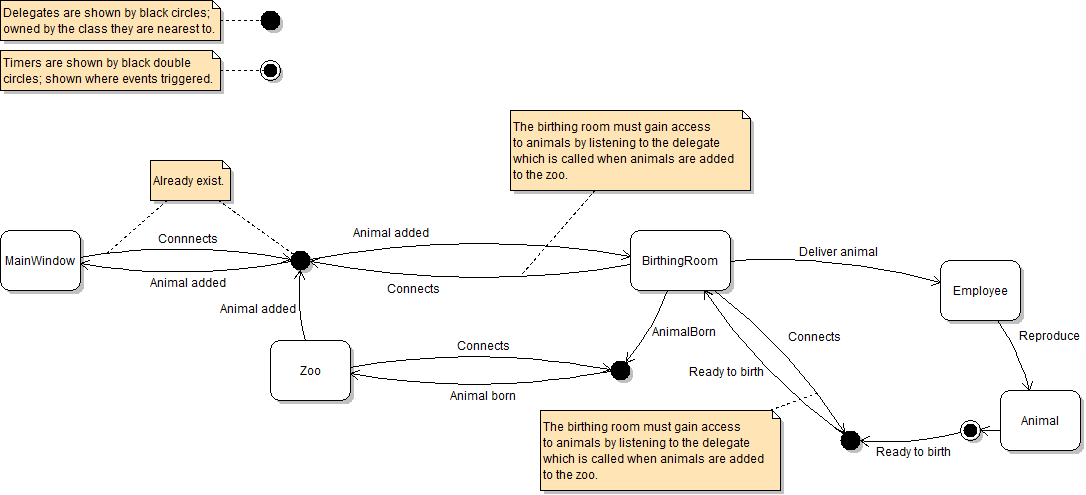
- The birthing room now needs to notify the zoo when a baby is born, so that the zoo can add it to its list
- Create an IReproducer Action read/write auto-property on the birthing room called OnReproducerBorn
- Call the action in the lambda attached to the OnReadyToBirth delegate, passing in the baby
- Attach a lambda expression to the birthing room's OnAnimalBorn action in the zoo's constructor
- In it, first check if the passed-in IReproducer is an Animal
- If it is, add the animal to the zoo
- Remove the BirthAnimal and BirthAllPregnantAnimals methods from the zoo
- Run the WPF application
- Add at least one pregnant animal
- Wait for the animal to give birth
- Ensure that the baby animal appears in the listbox after it is born
This nested lambda expression can be challenging to write. If you struggle to do it in a single step, attach the existing BirthingRoom's BirthAnimal method to the OnReadyToBirth action before incorporating the method inline into a lambda expression.
