
10-152-312 - Object-Oriented Programming 2
4.2 Zoo Assignment
Using Actions instead of delegates
- Change all existing custom delegates to Action
- For example, AnimalDelegate should become Action
- Remove all custom delegate declarations
Plugging a typed anonymous method into the BirthingRoom's OnTemperatureChange
- Instead of plugging a named method into the birthing room's OnTemperatureChange delegate, attach an anonymous method
- Type the following code in the zoo's constructor:
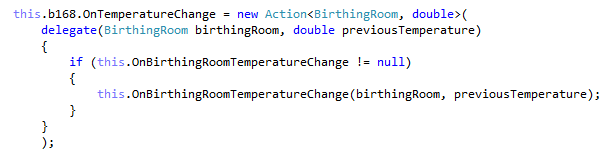
- Delete the named method that was attached to the OnTemperatureChange delegate
- Run the WPF application
- Change the temperature of the birthing room
- Ensure the temperature border and label still change in response to the temperature change
Changing OnTemperatureChange's typed anonymous method to an untyped one
- Delegates and anonymous methods offer a lot of built-in functionality, including automatic typing
- Instead of typing the anonymous method as an Action, remove the type entirely, as in the code below:

- Run the WPF application
- Change the temperature of the birthing room
- Ensure the temperature border and label still change in response to the temperature change
Anonymous methods - OnBirthingRoomTemperatureChanged in console
- Attach an anonymous method to the zoo's OnBirthingRoomTemperatureChanged delegate instead of a named method
- Copy the code inside the HandleBirthingRoomTemperatureChanged method to the body of the anonymous method
- Remove the HandleBirthingRoomTemperatureChanged method
- Run the console application
- Change the birthing room temperature
- Ensure the console still responds to the change using delegates
Anonymous methods - OnBirthingRoomTemperatureChanged in MainWindow
- Attach an anonymous method to the zoo's OnBirthingRoomTemperatureChanged delegate instead of a named method in the AttachDelegates method
- Copy the code inside the HandleBirthingRoomTemperatureChanged method to the body of the anonymous method
- Remove the HandleBirthingRoomTemperatureChanged method
- Run the WPF application
- Change the birthing room temperature
- Ensure the temperature border and label still update in response to the temperature change
Anonymous methods - move timer handler
- Attach an anonymous method to the animal's moveTimer Elapsed event handler instead of a named method in the CreateTimers method
- Event handlers, unlike delegates, require the += notation, as in the code below:

- Remove the MoveHandler
- Run the WPF application
- Create a few animals
- Show their cage
- Ensure the animals still move on each tick of the move timer
Anonymous methods - OnCageableUpdate in CageWindow
- Attach an anonymous method to the cage's OnCageableUpdate delegate instead of the named Update method
- Remove the Update method
- Run the WPF application
- Create a few animals
- Show their cage
- Ensure animals are still drawn correctly each time they move
Anonymous methods - OnStatusUpdate in Cage
- Attach an anonymous method to the cageable's OnStatusUpdate delegate instead of named method in the cage's Add method
- Copy the code inside the HandleCageableUpdate method to the anonymous method
- Remove the HandleCageableUpdate method
- Notice that the same code (the calling of the OnCageableUpdate delegate) now exists twice in the Add method
- Instead of calling the OnCageableUpdate delegate, simply call the cageable's OnStatusUpdate delegate, as in the code below:
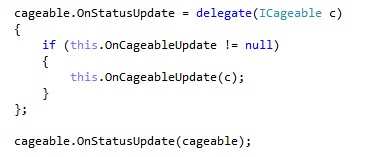
- Now that the HandleCageableUpdate method doesn't exist, it can't be unplugged from the OnStatusUpdate delegate
- Instead, simply set the OnStatusUpdate delegate to null in the Remove method
- Run the WPF application
- Create a few animals
- Show their cage
- Ensure animals are still drawn correctly each time they move
Anonymous methods - OnBalanceChange in Guest
- Create a property of type Action called OnBalanceChange in the IMoneyCollector interface
- Implement the property in the MoneyCollector class
- Call the delegate in the setter of the money collector's money balance property
- Ensure the money collector's add and remove methods call the money balance property instead of the field
- Attach anonymous methods in the Wallet constructor to the money collector's OnBalanceChange property
- In the method, call the wallet's OnBalanceChange delegate
- Attach an anonymous method to the wallet's OnBalanceChange delegate instead of the named method in the guest's constructor
- Copy the code in the HandleBalanceChanged method to the anonymous method
- Remove the HandleBalanceChanged method
- Attach an anonymous method to the checking account's OnBalanceChange delegate
- Call the guest's OnTextChange delegate from inside the method
- Add the checking account balance to the guest's ToString method
- Run the WPF application
- Create a guest with some money and an animal
- Have the guest feed the animal
- Ensure the guest's text display updates as their money balance changes
Anonymous methods - OnAddAnimal and OnRemoveAnimal in MainWindow
- Attach an anonymous method to the zoo's OnAddAnimal delegate in the MainWindow's AttachDelegates method
- Copy the code from the OnAddAnimal method to the anonymous method
- Remove the OnAddAnimal method
- Follow the same process for the zoo's OnRemoveAnimal delegate
- Run the WPF application
- Add at least one animal
- Ensure the animal is added to the list box
- Remove at least one animal
- Ensure the animal is removed from the list box
Anonymous methods - OnAddGuest and OnRemoveGuest in MainWindow
- Attach anonymous methods to the zoo's OnAddGuest and OnRemoveGuest delegates in the MainWindow's AttachDelegates method
- Follow the same procedure as with the OnAddAnimal and OnRemoveAnimal delegates
- Run the WPF application
- Add at least one guest
- Ensure the guest is added to the list box
- Remove at least one guest
- Ensure the guest is removed from the list box
Using anonymous methods in the zoo's FindXxx methods
- Replace the contents of the following methods in the Zoo class by calling .Find or .FindAll with anonymous methods
- FindAnimal (all overloads)
- FindEmployee
- FindGuest
- GetAnimals
Make animals hungry using a timer
- Add an enumeration called HungerState to the Cageable package
- Satisfied
- Hungry
- Starving
- Unconscious
- Add a read-only property on ICageable called HungerState of type HungerState
- Implement the property as read/write in Animal
- Implement the property as read-only in Guest and always return Satisfied
- Add a hunger timer to Animal
- Add a method to handle the timer's elapsed event called HungerHandler
- In the handler, switch to the next hunger state (e.g. if the current state is Hungry, then switch to Starving)
- In the CreateTimers method:
- Initialize the timer and set it to a random value between 10 and 20 seconds
- Plug in the HungerHandler to the timer's Elapsed event
- Start the timer
- Disable the timer when the animal is suspended
- Add the animal's hunger state to its ToString method
- Call the animal's OnTextChange delegate when its hunger state is set
- Run the WPF application
- Create a few animals
- Wait for the hunger timer to go off and ensure that each animal's display text changes in the list box
Make animals slow down or stop based on hunger state
- Animals move differently based upon their hunger state, so make these changes to the MoveHorizontally and MoveVertically helper methods
- Satisfied animals move as before
- Hungry animals move at 1/4 the normal rate
- Starving and unconscious animals do not move
- The contents of the hover behavior should only occur if the animal is not unconscious
- Run the WPF application
- Create a few animals of one type
- Show their cage
- Ensure that the animals move at their normal speed, slow down and then stop as the hunger timer goes off
Skew unconscious animals
- Unconscious animals are drawn differently
- Use a SkewTransform to skew them at a 30-degree angle in the direction they are facing (either 30 or -30)
- Use a ScaleTransform to scale them at 50% of their height and 75% of their width
- Create a TransformGroup
- Add these two transforms and the existing flip transform to the TransformGroup
- Set the viewbox's render transform to the new transform group, which may or may not contain some transformations
- Run the WPF application
- Create a few animals of one type
- Show their cage
- Ensure that unconscious animals are skewed in the direction that they are facing
Revive animals by feeding them
- In the animal's Eat method:
- Reset the animal's hunger state to satisfied
- Stop and restart the hunger timer
- Run the WPF application
- Open a cage window with at least one animal in it
- Let the animal slow down, stop or become unconscious
- Feed the animal
- Ensure that the animal begins moving again at regular speed after it is fed
Create a Func to provide a vending machine
- Create a VendingMachine Func called GetVendingMachine on the guest
- Attach an anonymous method to the guest's delegate upon adding a guest to the zoo
- In the method, return the zoo's animal snack machine
- In the MainWindow's feed animal button click, call the guest's GetVendingMachine delegate instead of using the AnimalSnackMachine property
- Do the same in the console application's feed command
- Remove the zoo's AnimalSnackMachine property
- Run the WPF application
- Have a guest feed an animal
- Ensure the feeding of animals still works
- Run the console application
- Have a guest feed an animal
- Ensure the feeding of animals still works
Allow guests to automatically feed their adopted animal
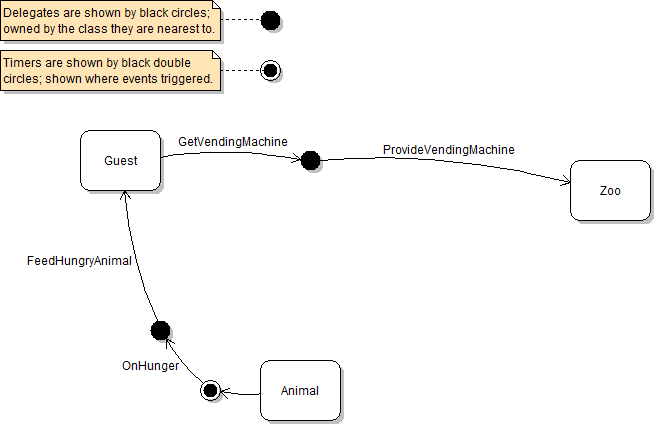
- Create an animal Action called OnHunger on the animal
- Call the action from the hunger handler
- Create a feed timer on the guest and set its interval to 5 seconds
- Set the timer's Elapsed event to an anonymous method that feeds the adopted animal and stops the timer
- In the guest's AdoptedAnimal setter:
- First, if there already was an adopted animal, unplug the feed hungry animal method from the animal's on hunger delegate/li>
- Then, set the new value as the adopted animal
- Then, if the new adopted animal exists, attach an anonymous method to the animal's on hunger delegate
- In the method, start the feed timer if the passed-in animal is starving or unconscious
- Last, call the guest's on text change delegate
- Run the WPF application
- Create at least one animal and one guest
- Open the animal's cage window
- Have the guest adopt the animal
- Ensure that, as the animal starves or becomes unconscious, the guest automatically feeds it and the animal begins moving again at full speed
Fix serialization
- Mark the guest's feed timer as nonserialized
- Refactor the guest's feed timer initialization to a method called CreateTimers
- Create an OnDeserialized method on the guest and model it after the animal's OnDeserialized method
- Call the CreateTimers method from the OnDeserialized method
- Run the application
- Create at least one guest and one animal
- Have the guest adopt the animal
- Stop the application and re-run it
- Ensure that the guest and animal are deserialized correctly and the guest automatically feeds its adopted animal as it becomes starving or unconscious
Grading and Submission
- Build/compile your program
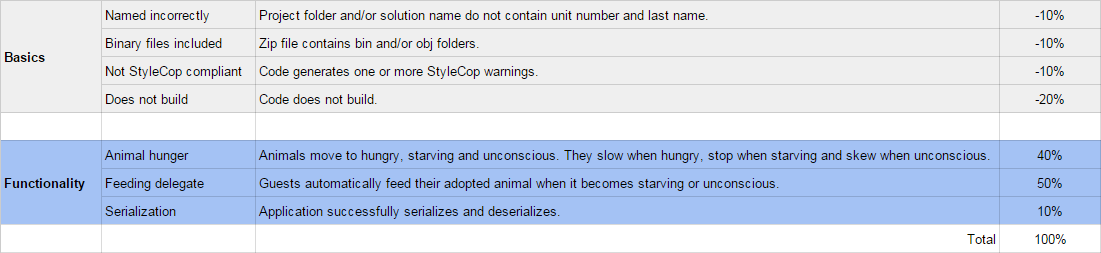
- Debug/test your program against the following rubric:
- Make your code StyleCop-compliant
- Close your Visual Studio solution
- Compress your Visual Studio solution to a zip file
- Submit the zip file via Blackboard