
10-152-312 - Object-Oriented Programming 2
4.1 Zoo Assignment
Starting .zip File.
- Unzip the OOP2_4.1Zoo zip file.
- Rename the folder, changing "LastName" to your last name.
- Open the contained solution (.sln) file and examine the code in preparation for making further changes as specified below.
Adding birthing room temperature controls to MainWindow
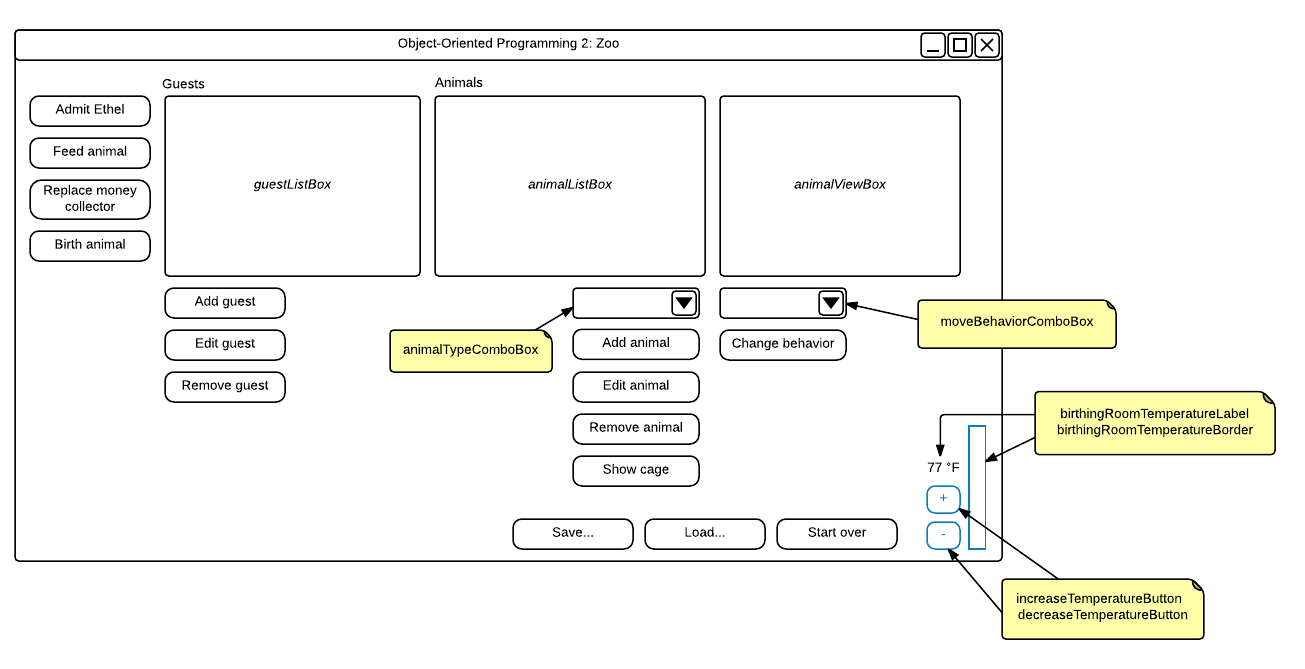
- Add the following controls to the MainWindow as shown in the wireframe
- A border called birthingRoomTemperatureBorder with default Background of Red
- A label called birthingRoomTemperatureLabel
- A button called increaseTemperatureButton
- A button called decreaseTemperatureButton
- All controls should stay on the bottom and the right side of the window as it stretches
- Add a click event to both buttons
- The increase button should increment the birthing room temperature by 1
- The decrease button should decrement the birthing room temperature by 1
Dynamically updating the birthing room temperature in the console
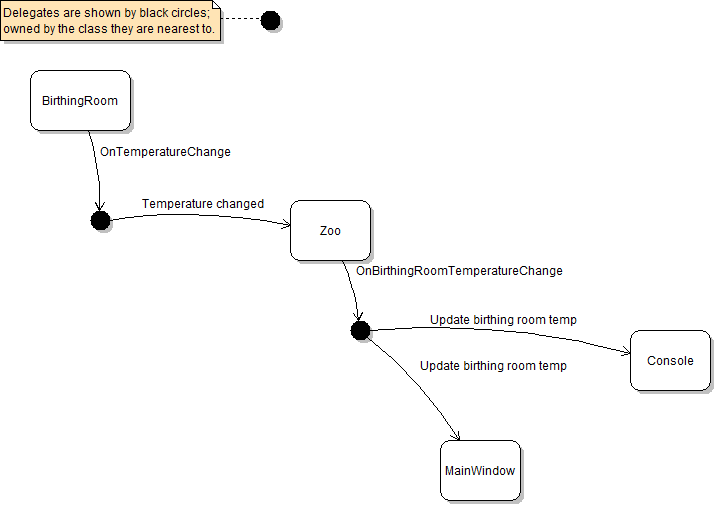
- Create a BirthingRoomDelegate that takes a BirthingRoom as a parameter
- In the BirthingRoom, add a BirthingRoomDelegate auto-property called OnTemperatureChange
- If the delegate is not null, call it when the birthing room's temperature is changed
- In the Zoo, add a method called BirthingRoomTemperatureChanged and plug it in to the birthing room's BirthingRoomDelegate
- Add a BirthingRoomDelegate full property (field plus a read/write property) called OnBirthingRoomTemperatureChange
- If OnBirthingRoomTemperatureChange is not null, call it from the BirthingRoomTemperatureChanged method
- In the console, add a method called UpdateBirthingRoomTemperature
-
- Inside the method, write to the console the current temperature of the passed-in birthing room
- Plug it in to the zoo's OnBirthingRoomTemperatureChange delegate after the zoo is created in the "start" command
- In the console's "temperature" command, remove the code that writes the temperature to the console
- Run the console application
- Create the zoo (using the "start" command)
- Update the temperature to 80 degrees
- A message about the updated temperature should be written to the console
Dynamically updating the birthing room temperature in the MainWindow
- Add a method to the MainWindow called UpdateBirthingRoomTemperature that takes a BirthingRoom as a parameter and add the following code:
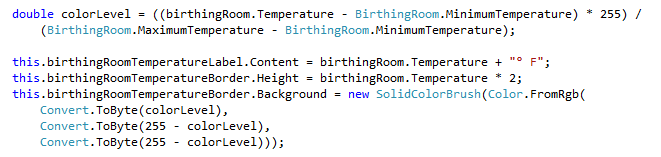
- Create a private method in MainWindow for attaching delegates called AttachDelegates
- In it, attach the UpdateBirthingRoomTemperature method to the zoo's OnBirthingRoomTemperatureChange delegate
- Call AttachDelegates wherever a zoo is loaded or created
- Run the WPF application
- Click the increase button
- The label should update with the new temperature and the border should grow and change color as the temperature changes
- Click the decrease button
- The label should update with the new temperature and the border should shrink and change color as the temperature changes
Dynamically updating the guest list box
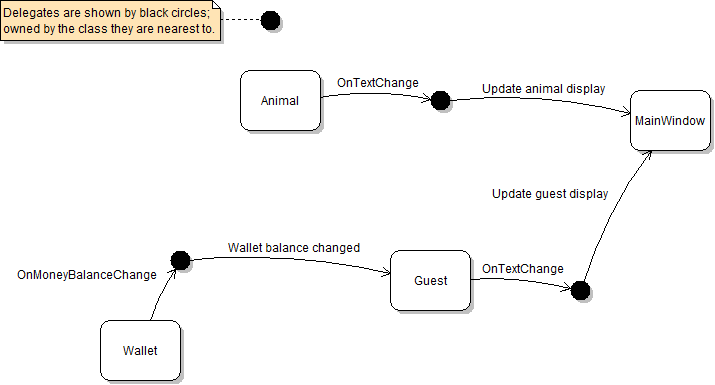
- Remove the PopulateGuestListBox() method and all calls to it
- Define a Guest delegate
- Create a GuestDelegate field called onTextChange and a read/write property for it in Guest
- Call the delegate when displayed fields change, including:
- Age
- Name
- Money balance should also update dynamically when it is changed
- Define a Wallet delegate
- Create a read/write WalletDelegate property in Wallet called OnMoneyBalanceChange
- Call the delegate whenever the money balance changes
- Create a method in Guest called OnWalletMoneyBalanceChange that calls the Guest's text change delegate
- Attach the Guest's OnWalletMoneyBalanceChange method to the Wallet's delegate
- Create two GuestDelegate fields in Zoo called onAddGuest and onRemoveGuest and read/write properties for them
- Call the add delegate when a guest is added to the zoo
- Call the remove delegate when a guest is removed from the zoo
- Create a method on MainWindow to respond to the Zoo's removal of guests that removes the passed-in guest from the list box
- Create a method on MainWindow to respond to the Zoo's adding of guests that adds the passed-in guest to the list box
- Attach the window's add and remove guest methods to the Zoo's delegates in the AttachDelegates method
- Create a method on MainWindow called UpdateGuestDisplay to respond to Guest's delegate and repaint the list box
- Get the index of the passed-in guest
- If the index is greater than or equal to 0, then:
- First set the item at that index in the list box to null
- Then set the item at that index in the list box to the passed-in guest
- Wrap this method's code inside the Dispatcher's Invoke method, as it will eventually be triggered by a timer thread
- Attach the UpdateGuestDisplay method to the Guest's OnTextChange delegate in the MainWindow's OnAddGuest method
Dynamically updating the animal list box
- Use delegates to get the animal list box to update dynamically
- Use the steps for updating the guest list box as a guide
Moving animals using delegates
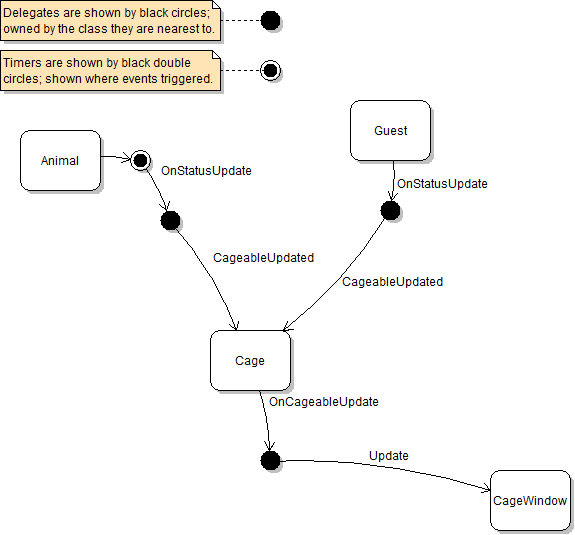
- This series of delegates will be similar to the birthing room temperature delegates
- ICageable will have a CageableDelegate on it that Guest and Animal must implement
- Those delegates attach to a method in Cage that calls its own CageableDelegate called OnCageableUpdate
- The delegate should be plugged in in the Cage's Add method and unplugged in the Cage's Remove method
- The CageWindow should plug in the cage's delegate to its Update method in the constructor
- In the Remove method, unplug the Update method from the animal's move delegate
- Remove the IObserver and ISubject interfaces and remove the Observers package
Serializing and deserializing delegates
- In the console, add a method called AttachDelegates
- Pass in a zoo and plug in the UpdateBirthingRoomTemperature method to the zoo's OnBirthingRoomTemperatureChange delegate
- Call AttachDelegates when a zoo is started and loaded
- Add the NonSerialized attribute to all delegate fields in Guest, Animal and Zoo
- Ensure that the MainWindow's AttachDelegates method is called after a zoo is created or loaded from a file
- Create a method in Zoo called OnDeserialized (do not mark it with the OnDeserialized attribute)
- In the method, call the zoo's OnBirthingRoomTemperatureChange delegate if it is not null
- Call the zoo's OnAddAnimal delegate for each animal if the delegate is not null
- Call the zoo's OnAddGuest delegate for each guest if the delegate is not null
- Call the method after a zoo is loaded from a file and after the delegates are attached
- Run the WPF and console applications
- Load a saved file
- Delegates should work immediately on deserialization
4.1 Zoo Assignment: Wireframe
Design the user interface per the following diagram.
Grading and Submission
- Build/compile your program
- Debug/test your program against the following rubric:
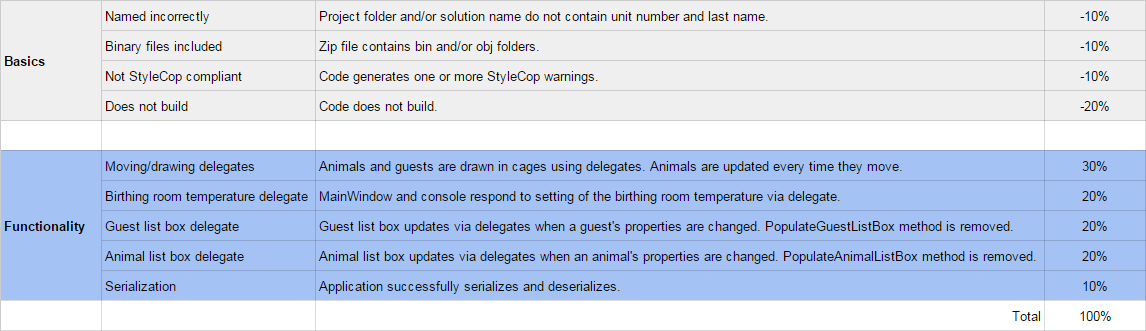
- Make your code StyleCop-compliant
- Close your Visual Studio solution
- Compress your Visual Studio solution to a zip file
- Submit the zip file via Blackboard