
10-152-312 - Object-Oriented Programming 2
3.3 Zoo Assignment
Refactoring the movement algorithms
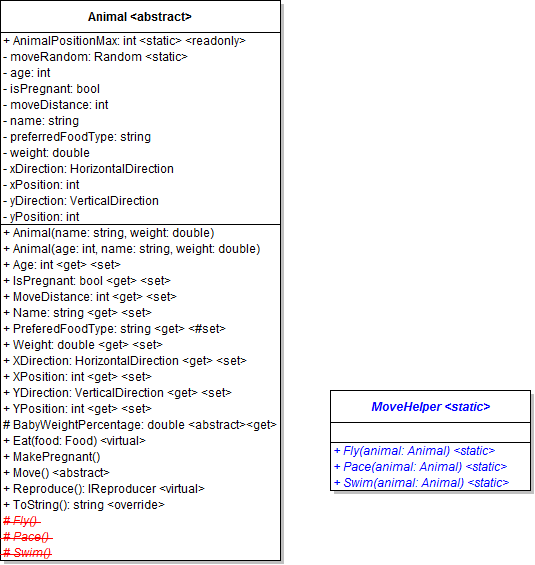
- Create the static MoveHelper class as shown in the diagram above
- Take the code from Animal's Fly(), Pace(), and Swim() methods and put it inside the appropriate method in the MoveHelper
- Alter the algorithms to use the passed-in animal parameter
- Remove the Fly(), Pace(), and Swim() from Animal, as that code has been encapsulated and is no longer needed
- Call the appropriate MoveHelper method from each animal's Move method
- Run your application and test that the animals still move as they did before
Moving animals with timers
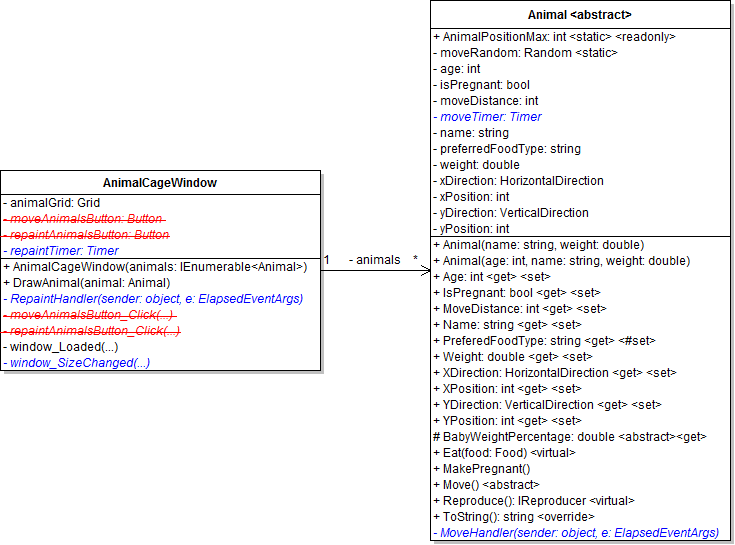
- Add the RepaintHandler to the AnimalCageWindow as shown in the diagram above
- Type the following code in the RepaintHandler to handle threading issues between painting and timer threads

- Add the repaint timer to the AnimalCageWindow as shown in the diagram above
- In the constructor, initialize the timer to a new timer with an interval of 1 second
- Add the RepaintHandler to the timer's Elapsed event handler (using += notation)
- Start the timer
- Add the NonSerialized attribute to the timer
- Remove the moveAnimals and repaintAnimals buttons and their click handlers (the timers are replacing that functionality)
- Alter the animalGrid so that it fills the entire window
- Add the MoveHandler to Animal as shown in the diagram above and call the Move() method from it
- Add the move timer to Animal as shown in the diagram above
- In the constructor, initialize the timer to a new timer with an interval of 1 second
- Add the MoveHandler to the timer's Elapsed event handler (using += notation)
- Start the timer
- Add the NonSerialized attribute to the timer
- Add a window_SizeChanged event handler to the AnimalCageWindow and call DrawAllAnimals() from it
- Run your application and test that the animals move and are repainted automatically every second
Implementing the strategy pattern with animal movements
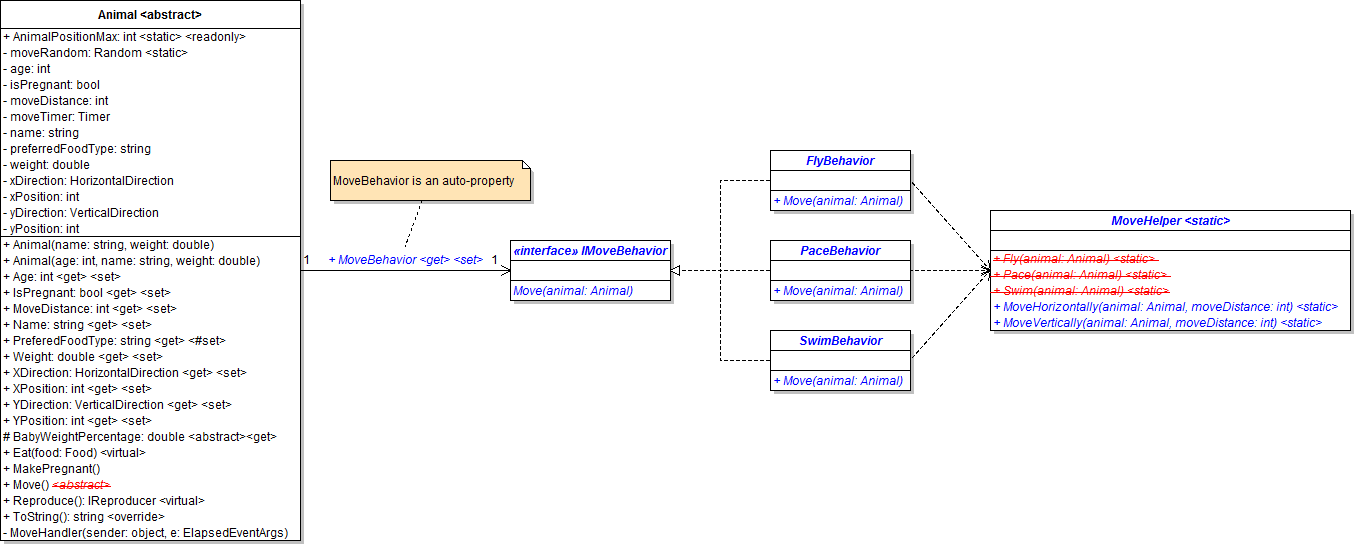
- Create the IMoveBehavior interface as shown in the diagram above
- Create the three move behavior classes and implement the interface as shown in the diagram above
- Add an IMoveBehavior field and read/write property to Animal
- Set each animal's MoveBehavior property to the appropriate behavior in its constructor, using inheritance and overriding where appropriate
- Refactor the movement algorithms in the MoveHelper into the MoveHorizontally() and MoveVertically() methods and use the moveDistance parameter where appropriate
- Call the MoveHorizontally and MoveVertically methods from the move behavior's Move() methods in a way that preserves each movement
- Remove all Move() methods from descendant animals (to reduce redundancy)and implement Animal's Move method by calling MoveBehavior's Move method
- Run your application and test that the animals still move as they did before
Testing the strategy pattern

- Create an enum of move behavior types as shown in the diagram above
- Create the MoveBehaviorFactory as shown in the diagram above (it will function similar to the AnimalFactory)
- Add a combo box to the MainWindow and populate it with the MoveBehaviorType enum
- Add a button to the MainWindow that changes an animal's move behavior
- Use the animal selected in the list box
- Set its MoveBehavior to the type chosen in the combo box
- Run your application and test that an animal's move behavior changes when the button is clicked
Implementing the strategy pattern with more animal behaviors
- Implement the pattern with the following reproduction behaviors
- GiveBirthBehavior
- LayEggBehavior
- Implement the pattern with the following eating behaviors (move weight gaining code to Eat methods)
- ConsumeBehavior
- BuryAndEatBoneBehavior
- ShowAffectionBehavior
Birthing animals
- Add a button to the MainWindow that births an animal
- Use the animal that is selected in the list box
- Find the vet employee
- Birth the selected animal if it is actually pregnant
- Add error handling and/or null checks where appropriate
3.3 Zoo Assignment: Package Diagram
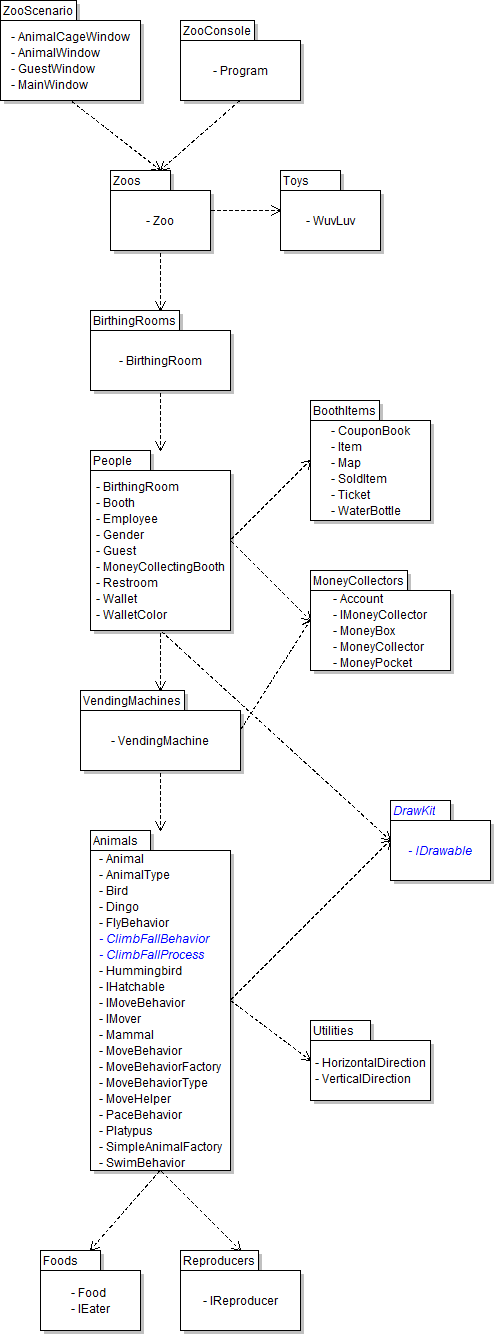
Create/revise the classes as indicated by the following UML package (class) diagram.
Notes
- Create WPF Window classes if class names end with Window; otherwise create basic classes.
- Note that not all classes need to be on a class diagram; if classes which existed previously do not appear on this particular diagram, they should not be deleted, as they are simply not relevant to this assignment, but may again be used in future assignments.
3.3 Zoo Assignment: Class Diagram
Create/modify the classes as specified in the following UML class diagram.
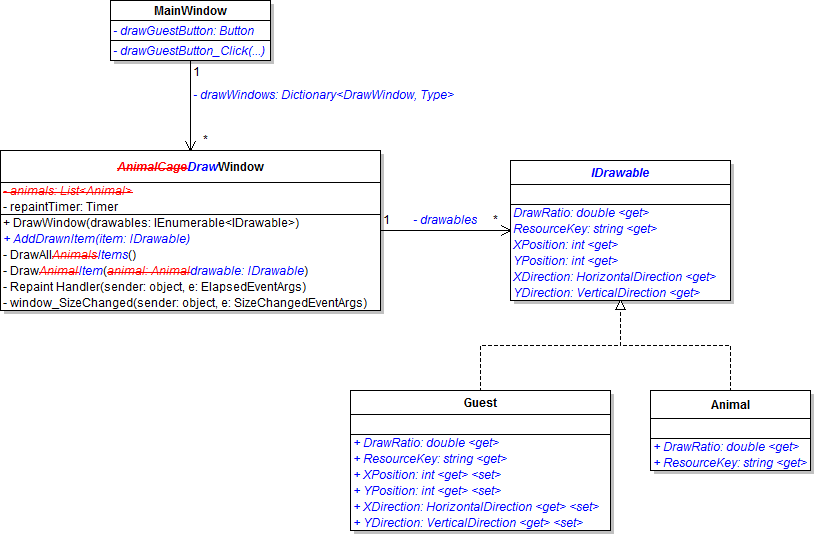
3.3 Zoo Assignment: Wireframe
Design the user interface per the following diagram.

Grading and Submission
- Build/compile your program
- Debug/test your program against the following rubric:
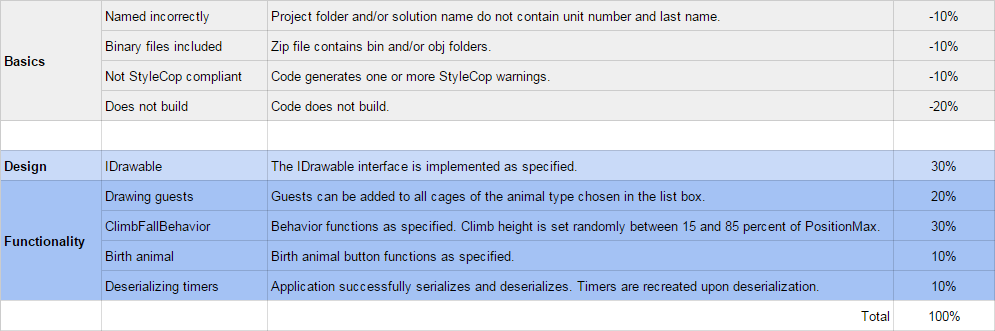
- Make your code StyleCop-compliant
- Close your Visual Studio solution
- Compress your Visual Studio solution to a zip file
- Submit the zip file via Blackboard