
10-152-312 - Object-Oriented Programming 2
3.2 Zoo Assignment
Getting started
- Create packages, windows and classes as specified in the package and class diagrams
- Design the AnimalCageWindow as specified in the wireframe
- Unzip the starting zip file and copy and paste the code in the .txt file to App.xaml
MainWindow
- Type the following code into the the animalListBox's selection changed event handler:
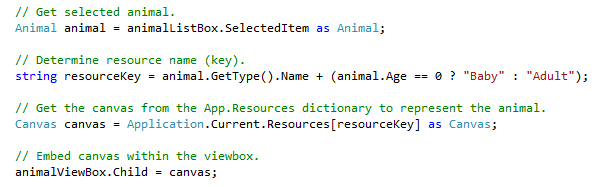
- The showAnimalCage button should open the AnimalCageWindow when clicked
- The AnimalCageWindow should show the type of animal that is selected in the list box
- For extra credit, make the AnimalCageWindow show the type of animal that is selected in the combo box
AnimalCageWindow
- Make the buttons in the window stay on the bottom of the window when it is resized
- In the moveAnimalsButton event handler, call the Move() method for each animal in the window's list of animals
- In the DrawAllAnimals() method, clear the animalGrid and call the DrawAnimal() method for each animal in the window's list of animals
- Draw all animals in the repaintButton and window_Loaded event handlers
- Type the following code into the DrawAnimal() method:
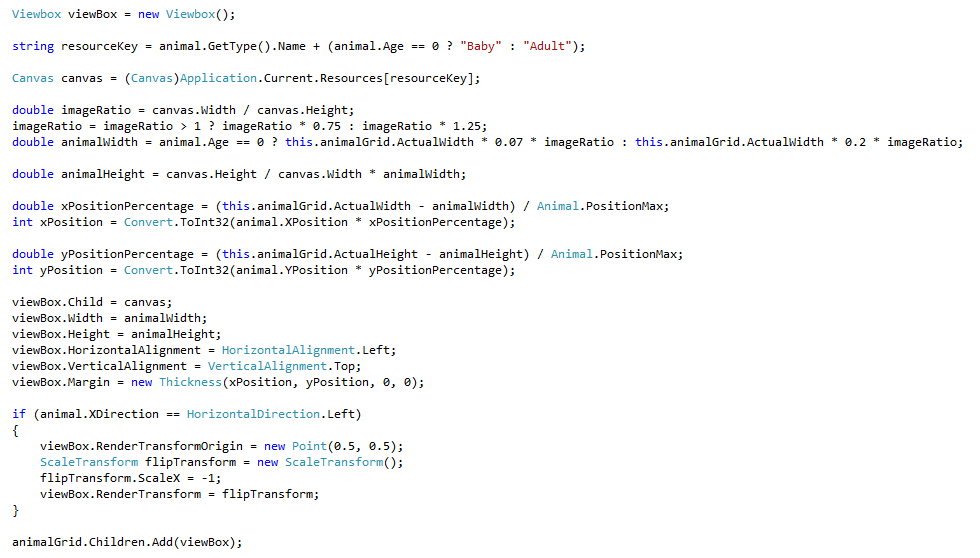
- Write code comments in the DrawAnimal method to demonstrate your understanding of what the code is doing
Moving animals
- Initialize the Animal's PositionMax to 500
- Initialize the Animal's moveRandom to a new Random object with a seed of DateTime.Now.Millisecond
- In the Animal's constructor, initialize the moveDistance to moveRandom's Next value between 1 and 10
- Chain Animal's two constructors so that the constructor without an age calls the constructor with an age instead of base
- Type the following code into the Mammal's Move method
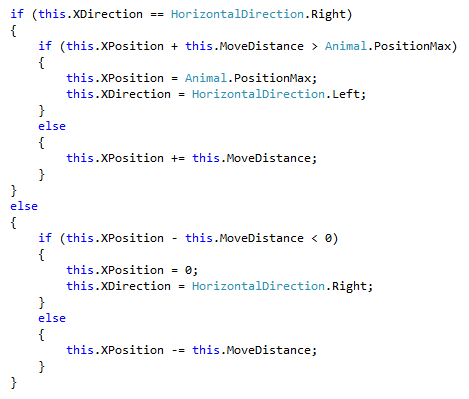
- Write code comments in the Move method to demonstrate your understanding of what the code is doing
- Write code in the Bird's Move method that simulates flying:
- Flying is similar to pacing, but the animal reverses vertical direction each time it moves
- When the animal moves vertically, it moves by 10
- Write code comments explaining what the code is doing
- Write code in the Fish's Move method that simulates swimming
- Swimming is also similar to pacing, but the animal moves at a 45-degree angle
- The animal should switch direction after hitting a vertical or horizontal edge
- Write code comments explaining what the code is doing
- Each animal moves in the following way:
| Chimpanzee | Pace |
| Dingo | Pace |
| Eagle | Fly |
| Hummingbird | Fly |
| Ostrich | Pace |
| Platypus | Swim |
| Shark | Swim |
- Copy the contents of the moving algorithm into each animal's overridden Move method, where appropriate
Testing
- Run the application and step through the following methods:
- Ostrich's Move method
- Platypus's Move method
- Bird's Move method
Improving animals' movement
- Add three protected methods to Animal
- Fly
- Pace
- Swim
- Move the code for each movement algorithm into the appropriate method in Animal
- Call the appropriate movement method in all overridden Move methods and remove all duplicate code
- Run the application to ensure all animals move as they did before your improvements
Randomizing animals' starting positions
- In the constructor, initialize Animal's XPosition and YPosition to the next random value between 0 and the max position
- Initialize Animal's XDirection and YDirection to the next random value between 0 and 1
- If the value is 0, XDirection is Left and YDirection is Up
- If the value is 1, XDirection is Right and YDirection is Down
- Run the application to ensure that all animals start at random coordinates
Console
- Add commands to the console application as specified in the console diagram
- Add error handling where appropriate
3.2 Zoo Assignment: Package Diagram
Create/revise the classes as indicated by the following UML package (class) diagram.
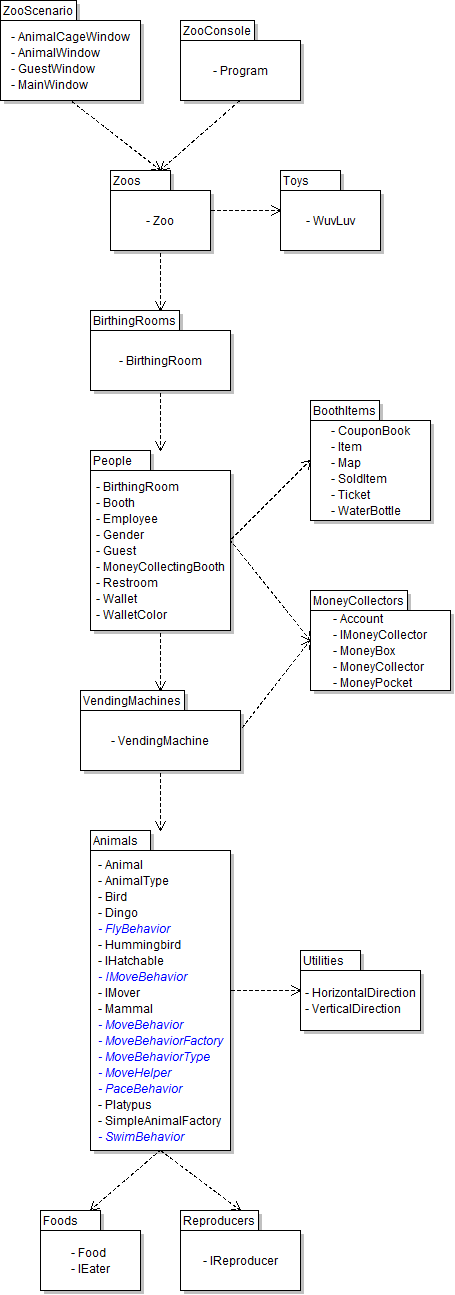
Notes
- Create WPF Window classes if class names end with Window; otherwise create basic classes.
- Note that not all classes need to be on a class diagram; if classes which existed previously do not appear on this particular diagram, they should not be deleted, as they are simply not relevant to this assignment, but may again be used in future assignments.
3.2 Zoo Assignment: Class Diagram
Create/modify the classes as specified in the following UML class diagram.
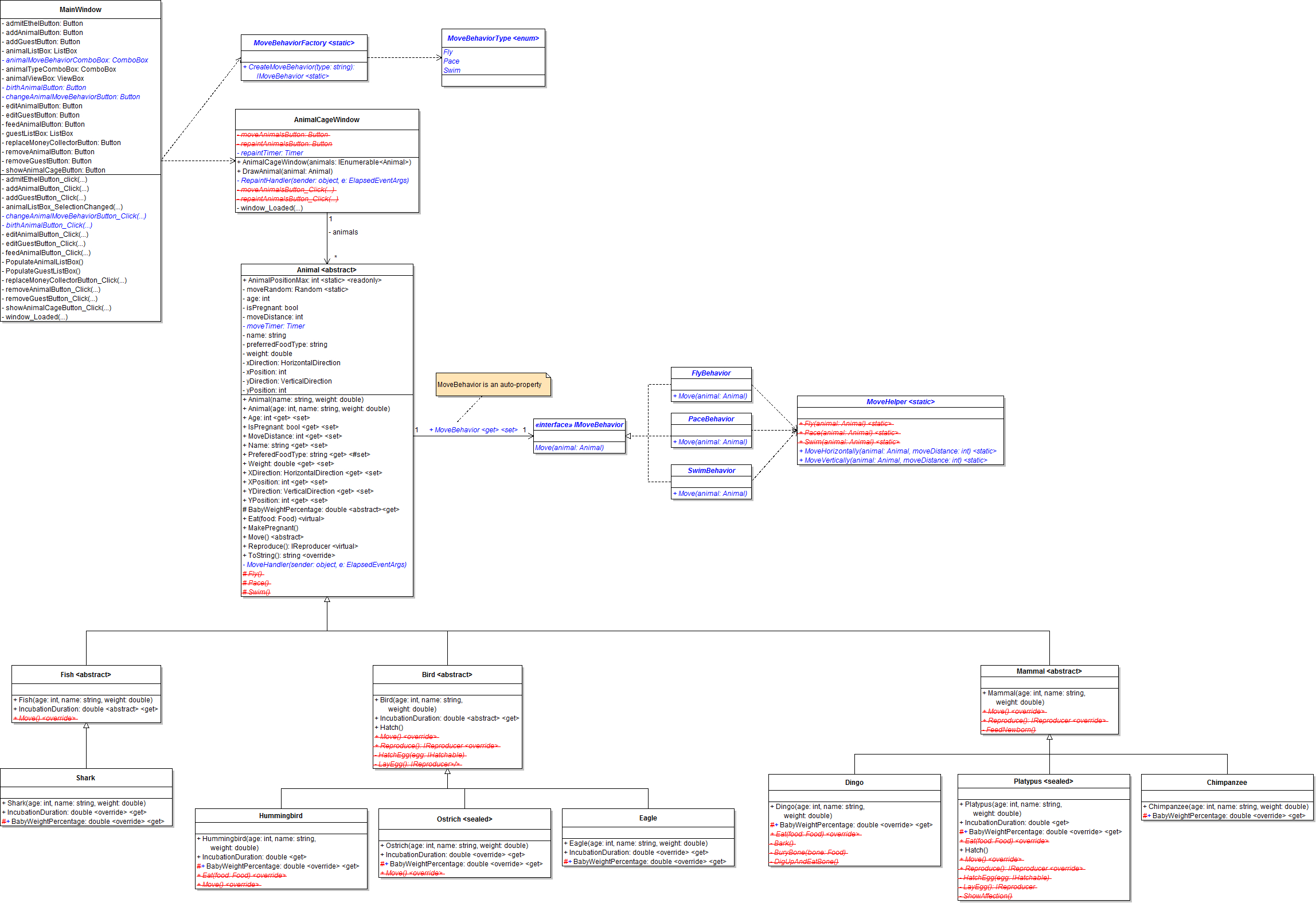
3.2 Zoo Assignment: Console Command Diagram
Implement console commands per the following diagram.
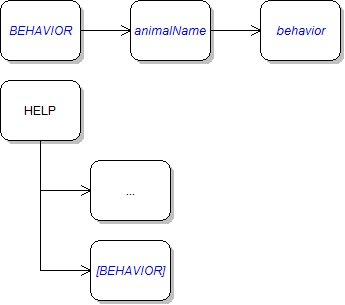
3.2 Zoo Assignment: Wireframe
Design the user interface per the following diagram.
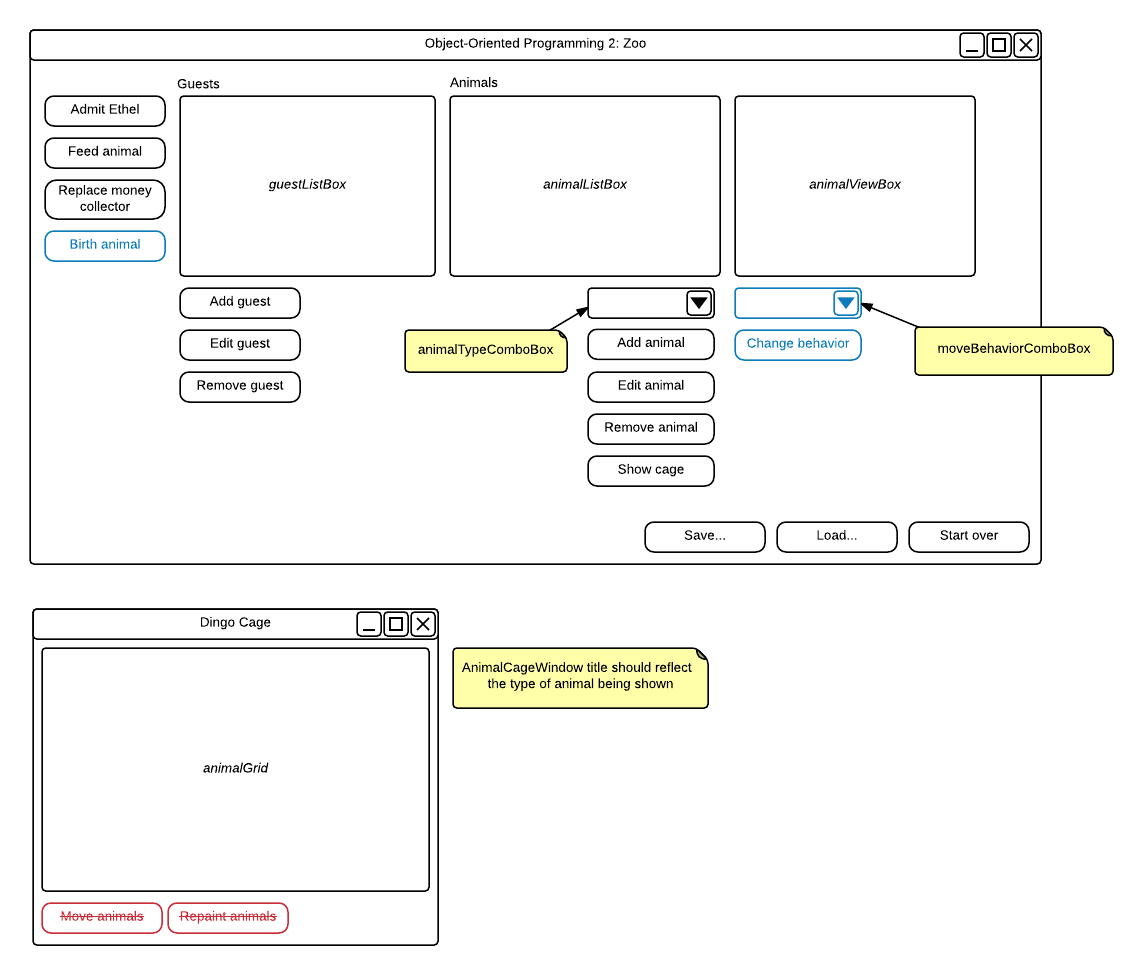
Grading and Submission
- Build/compile your program
- Debug/test your program against the following rubric:
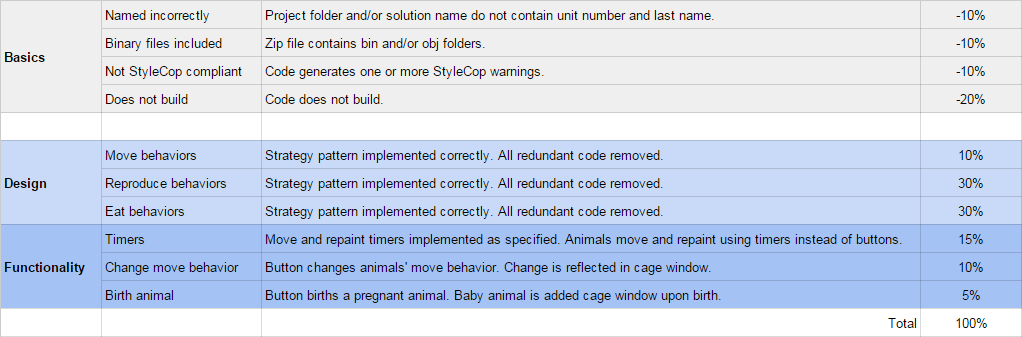
- Make your code StyleCop-compliant
- Close your Visual Studio solution
- Compress your Visual Studio solution to a zip file
- Submit the zip file via Blackboard