
10-152-312 - Object-Oriented Programming 2
3.1 ShortcutManager Assignment
Getting started
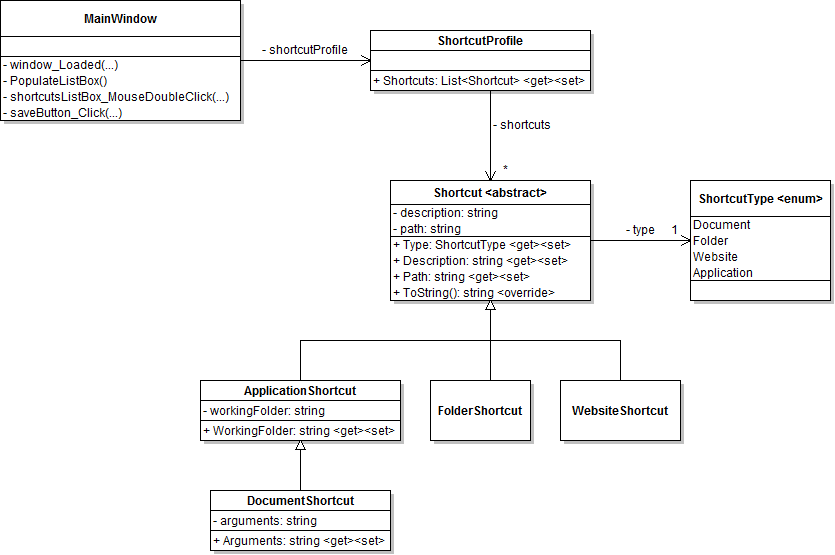
- Create all classes as specified in the class diagram
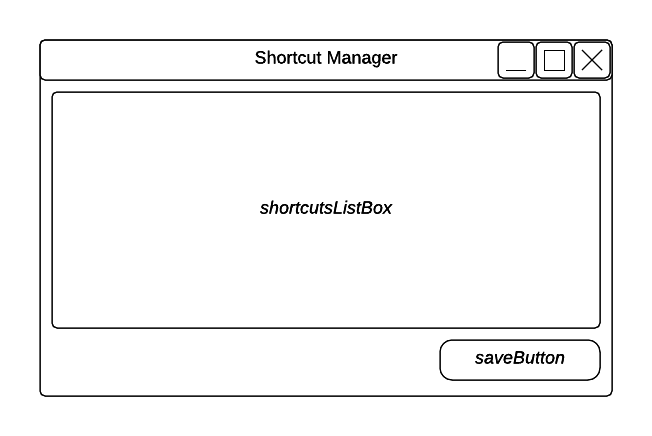
- Create the window as specified in the wireframe
ShortcutProfile
- Following the example, use an object initializer to populate the shortcuts List with data

- Add XmlInclude attribute for each shortcut type, e.g. [XmlInclude(typeof(XxxShortcut))] (all four should be added to the profile, not to the individual classes)
MainWindow
- PopulateListBox should behave as the similar methods do in the Zoo Scenario
- Call PopulateListBox() from the window's loaded event handler
- In the list box's double click event handler:
- Get the selected item from the list box
- Create a new Process
- Set the process' StartInfo properties as follows:
- Set the FileName to the shortcut's Path
- Set the Arguments to the shortcut's Arguments (if a document shortcut)
- Set the UseShellExecute to true (if an application shortcut)
- Set the WorkingDirectory to the shortcut's WorkingFolder (if an application shortcut)
- Start the process
- If the process does not start, show the user an error message
- Add type-checking where appropriate
- Add error handling where appropriate
- Serialize the shortcut profile to a file called ShortcutManager.xml in the save button's click event handler
- Use an XmlSerializer, which behaves similarly to a BinaryFormatter
- Research XmlSerializer as needed
- Add using directives as needed
Run the application
- Start the application and click the save button
- Examine the ShortcutManager.xml file
- The file should be stored in the bin/Debug folder
- Notice the new xsi:type attributes on each shortcut element. These are automatically when serializing descendant objects.
- Deserialize the ShortcutManager.xml file in the window's loaded event handler
- Use an XmlSerializer, which behaves similarly to a BinaryFormatter
- Research XmlSerializer as needed
- Comment out the ShortcutProfile's object initializer
Finishing up
- Remove the save button from the MainWindow
- Copy the ShortcutManager.xml file to the root folder of the solution before zipping and submitting it
- When you want to add a shortcut to the manager, simply add it to the existing xml file in the same way as the other shortcuts
3.1 ShortcutManager Assignment: Class Diagram
Create/modify the classes as specified in the following UML class diagram.
3.1 ShortcutManager Assignment: Wireframe
Design the user interface per the following diagram.
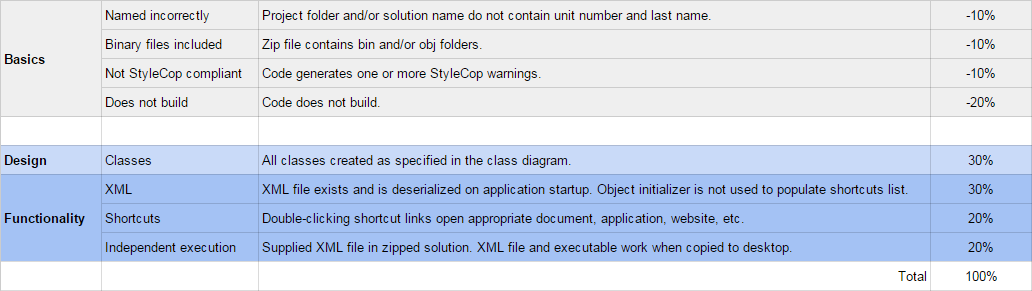
Grading and Submission
- Build/compile your program
- Debug/test your program against the following rubric:
- Make your code StyleCop-compliant
- Close your Visual Studio solution
- Compress your Visual Studio solution to a zip file
- Submit the zip file via Blackboard