10-152-311 - Object-Oriented Programming 1

5.3 Theater Test: Overview

Test Instructions:

  1. This test is "open book", meaning you can use any resources other than classmates as an aid to completing the test.
  2. If you turn to tutors or me for signifiant assistance, points may be deducted as indicated on the rubric.
  3. This test is based off of the work completed as part of the assignments from Learning Plans 4 through 5.
  4. To increase your chances of successfully completing the test, complete each of the sections of the test before moving on to the next, as subsequent steps build upon the work completed in earlier steps. Ensure that all changes specified in the class diagram were applied correctly; use the debugger to examine the state of your objects and compare them to the object diagram; use the debugger to ensure that all methods are called as specified in the sequence diagram.

5.3 Theater Test: Class Diagram

Implement the changes specified in the following UML class diagram.
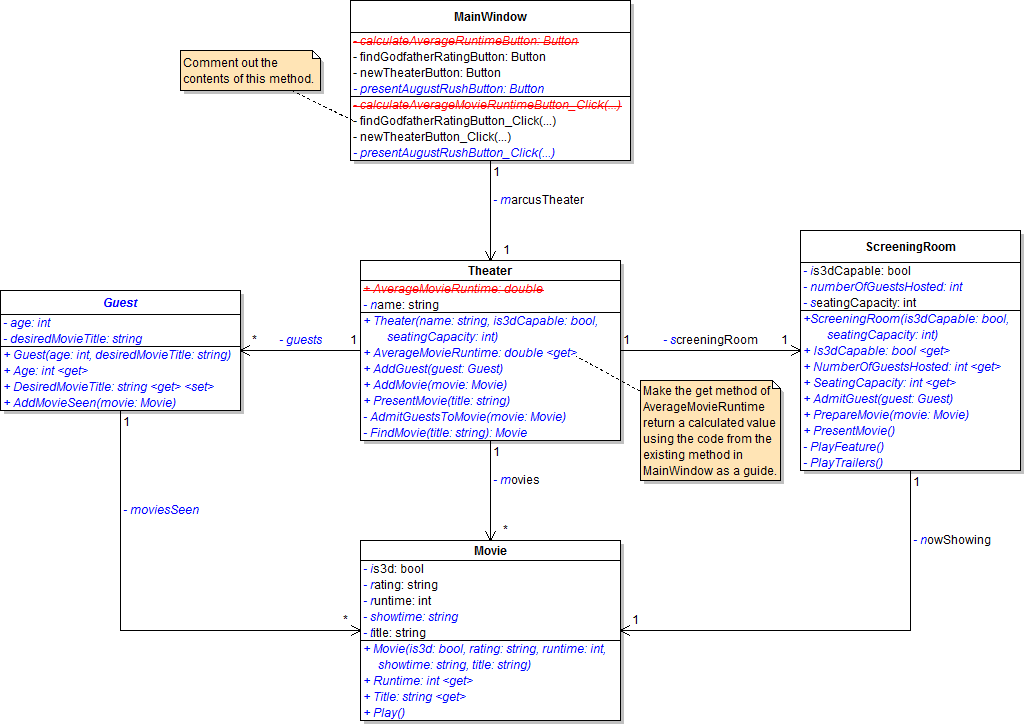
PNG image of 5.3  Theater UML class diagram
  1. When creating classes be sure to:
    1. Ensure the class in the root namespace. This can be done in one of two ways. Either by adding the class in the project, i.e. scenario, or by adding the class to the business classes folder and removing the ".Business_Classes" designation from the namespace.
  2. Open the main window (MainWindow.xaml) in designer mode (right-click and click "View Designer" or press Shift-F7 to go to designer mode).
5.3 Theater Test: Object Diagram

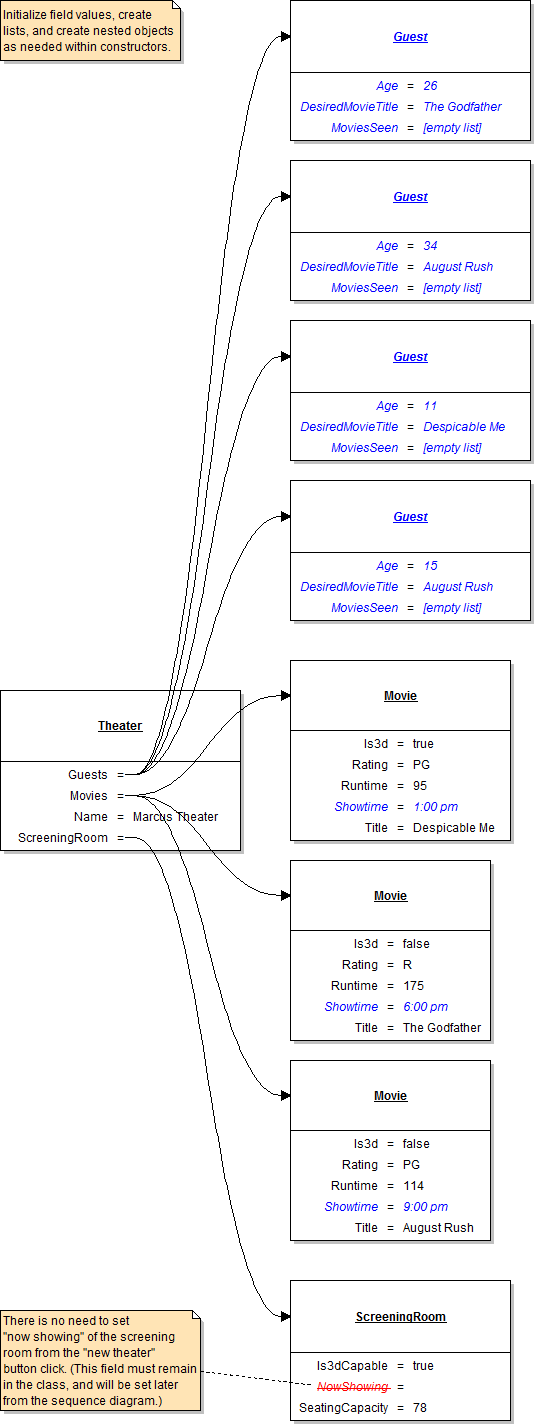
Instantiate the objects and set their field values as specified in the following UML object diagram.

PNG image of 5.3 Theater UML object diagram

5.3 Theater Test: Code Snippet

Within the newTheaterButton click event handler use the following code snippet as your guide to writing the code.

Delete all existing code in newTheaterButton_Click, replacing with the following:

// Create the theater.

// Add the four guests to the theater.

// Add the three movies to the theater.

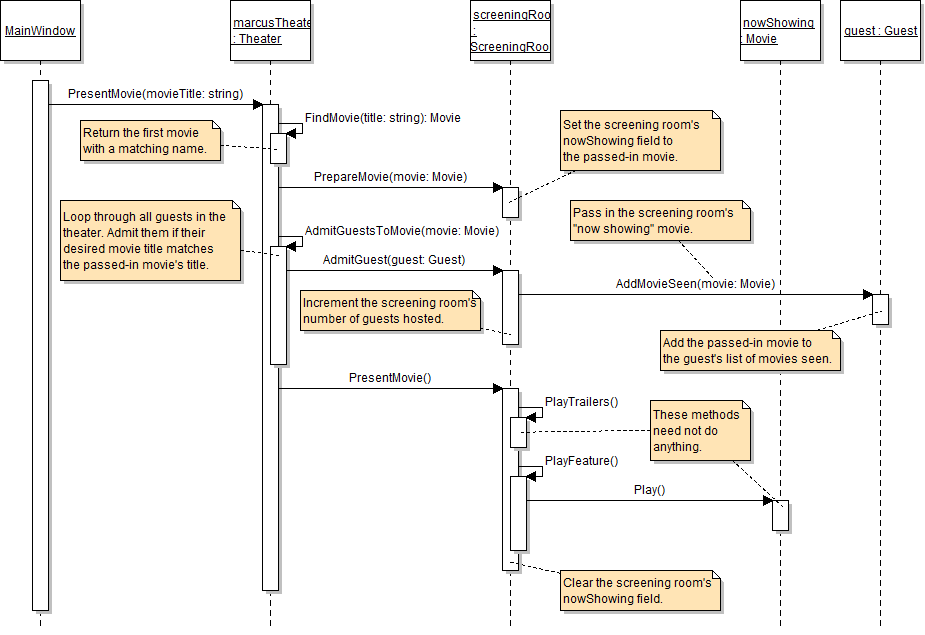
5.3 Theater Test: Sequence Diagram 1

presentAugustRushButton

PNG image of the 5.3 Theater UML sequence diagram #1

5.3 Theater Test: Final Steps

Button details:

  1. Write code in the "Present August Rush" button click event handler to implement the code specified in the sequence diagram.

Test script:

  1. Click the "New theater" button.
  2. Click the "Present August Rush" button.
  3. Use the debugger to ensure that methods are called and fields are set as specified on the sequence diagram.

Starting Zip File

Unzip the Test 2 zip file, rename both the folder and the solution file to contain your last name, and use it as the starting point for your test.

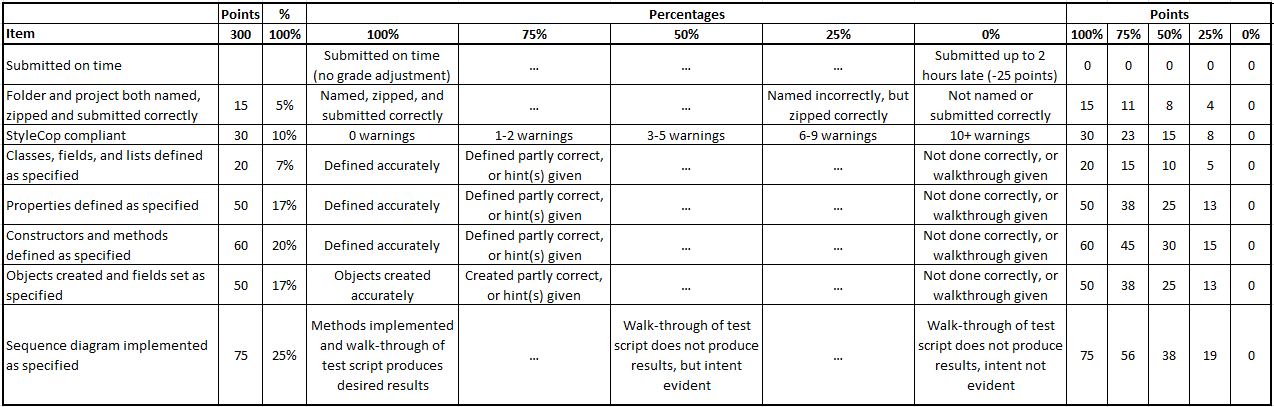
Test Rubric

PNG image of the Test 2 rubric

Test, Complete and Submit

  1. Build your program - Eliminate compiler errors and warnings
  2. Debug/Test your program - Set breakpoints, step through code, monitor values
  3. Make your code StyleCop-compliant
  4. Close your Visual Studio solution.
  5. Compress your Visual Studio solution to a zip file.
  6. Submit the zip file via Blackboard.

Grading Rubric

PNG image of the 5.3 Theater rubric