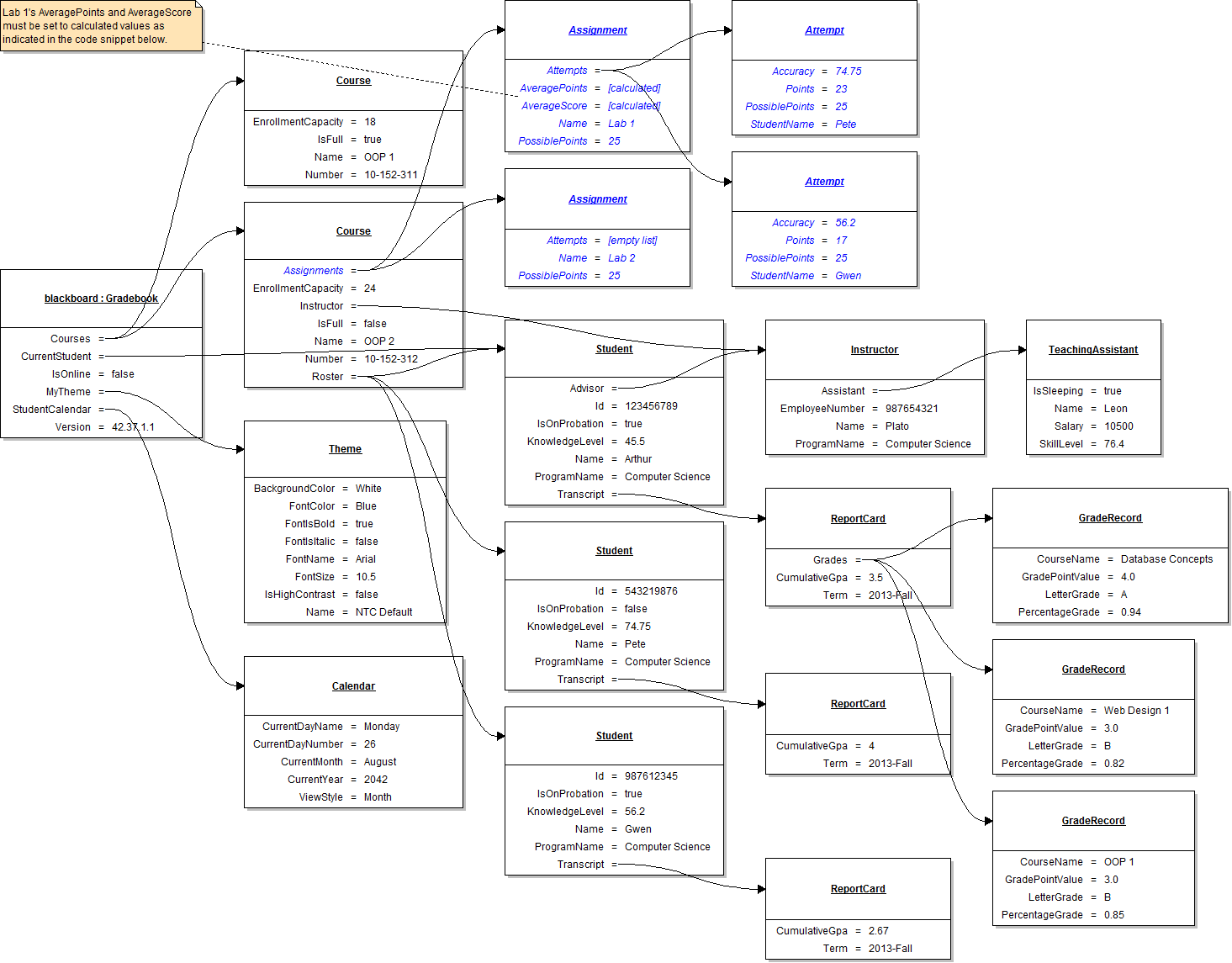
// Create an instance of the Gradebook class.
// Set field values of Blackboard (except for current student).
// Define a temporary course variable.
// Create an instance of the Course class (OOP 1).
// Set field values of the OOP 1 course.
// Add the OOP 1 course to the gradebook.
// Create an instance of the Course class (OOP 2).
// Set field values of the OOP 2 course.
// Define a temporary assignment variable.
// Create an instance of the Assignment class (Lab 1).
// Set field values of Lab 1 (except for AveragePoints and AverageScore).
// Define a temporary attempt variable.
// Create an instance of the Attempt class (Pete).
// Set field values of Pete's attempt.
// Add Pete's attempt to Lab 1's list of attempts.
// Create an instance of the Attempt class (Gwen).
// Set field values of Gwen's attempt.
// Add Gwen's attempt to Lab 1's list of attempts.
// Define and initialize a "total points" accumulator variable.
// Loop through all of Lab 1's attempts, summing their points.
// Set Lab 1's AveragePoints by dividing the total points variable by Lab 1's number of attempts.
// Set Lab 1's AverageScore by dividing its AveragePoints field by its PossiblePoints field.
// Add Lab 1 to the course's list of assignments.
// Create an instance of the assignment class (Lab 2).
// Set field values of Lab 2.
// Add Lab 2 to the course's list of assignments.
// Set field values of the instructor.
// Set field values of the assistant.
// Define a temporary student variable.
// Create an instance of the Student class (Arthur).
// Set field values of Arthur.
// Set field values of Arthur's transcript.
// Define a temporary grade record variable.
// Create an instance of the GradeRecord class (Database Concepts).
// Set field values of the Database Concepts grade record.
// Add the Database Concepts grade record to the transcript's list of grades.
// Create an instance of the GradeRecord class (Web Design 1).
// Set field values of the Web Design 1 grade record.
// Add the Web Design 1 grade record to the transcript's list of grades.
// Create an instance of the GradeRecord class (OOP 1).
// Set field values of the OOP 1 grade record.
// Add the OOP 1 grade record to the transcript's list of grades.
// Set Arthur to be the current student.
// Add Arthur to the OOP 2 roster.
// Create an instance of the Student class (Pete).
// Set field values of Pete.
// Set field values of Pete's transcript.
// Add Pete to the Roster.
// Create an instance of the Student class (Gwen).
// Set field values of Gwen.
// Set field values of Gwen's transcript.
// Add Gwen to the Roster.
// Add the OOP 2 course to the gradebook.
// Set field values of my theme.
// Set field values of the student calendar.