
10-152-311 - Object-Oriented Programming 1

2.1 Airline Activity: Overview

Wuv Luv Air is an airline with a B757 plane. The plane's captain, Biggs, has logged quite a few flight hours. The current customer, Vladimir, is buying a ticket to Oslo.

This week, you will be defining classes to represent these new ideas, and will be creating instances of these objects and setting their fields.

2.1 Airline Activity: Class Diagram

Implement the changes specified in the following UML class diagram.
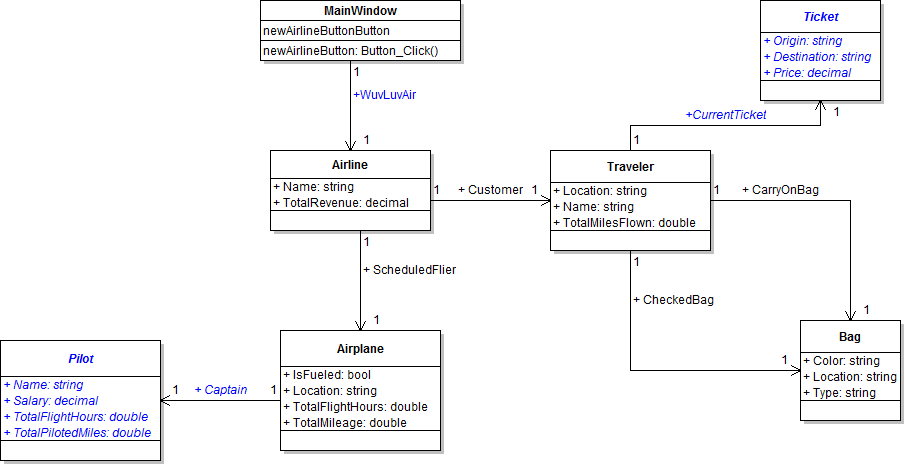
PNG image of 2.1  Airline UML class diagram
  1. When creating classes be sure to:
    1. Ensure the class in the root namespace. This can be done in one of two ways. Either by adding the class in the project, i.e. scenario, or by adding the class to the business classes folder and removing the ".Business_Classes" designation from the namespace.
    2. insert the following line of code immediately above the class definition:
      [System.Diagnostics.CodeAnalysis.SuppressMessage("Microsoft.StyleCop.CSharp.MaintainabilityRules", "SA1401:FieldsMustBePrivate", Justification = "Encapsulation not yet taught.")]
  2. Open the main window (MainWindow.xaml) in designer mode (right-click and click "View Designer" or press Shift-F7 to go to designer mode).
2.1 Airline Activity: Object Diagram

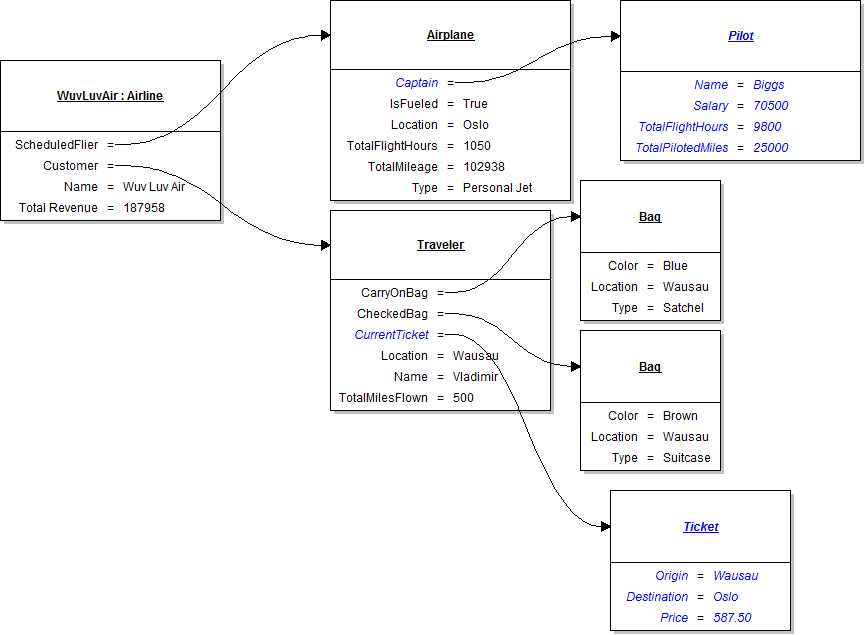
Instantiate the objects and set their field values as specified in the following UML object diagram.

PNG image of 2.1 Airline UML object diagram

2.1 Airline Activity: Code Snippet

Within the newAirlineButton click event handler use the following code snippet as your guide to writing the code.

// Create an instance of the Airline class.

// Set field values of Wuv Luv Air.

// Set field values of the CurrentFlier.

// Set field values of the captain.

// Set field values of customer.

// Set field values of carry on bag.

// Set field values of checked bag.

// Set field values of Current Ticket

Test, Complete and Submit

  1. Build your program - Eliminate compiler errors and warnings
  2. Debug/Test your program - Set breakpoints, step through code, monitor values
  3. Make your code StyleCop-compliant
  4. Close your Visual Studio solution.
  5. Compress your Visual Studio solution to a zip file.
  6. Submit the zip file via Blackboard.

Grading Rubric

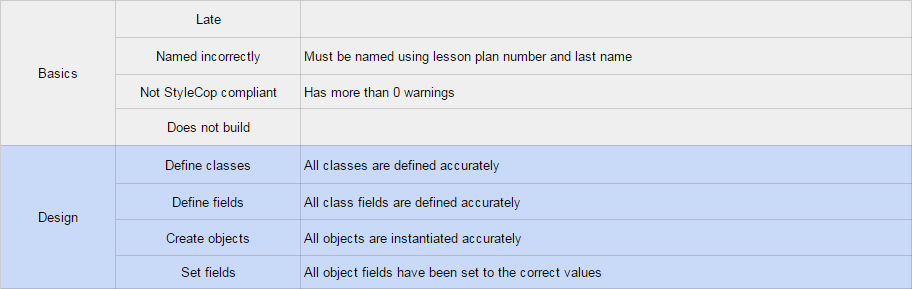
PNG image of the 2.1 Airline rubric