 Explore workplace security
Business Continuity
Business continuity is an important topic in enterprise computing, especially when the topic of security is also given focus. Business continuity is the ability of a corporation to continue functioning despite a disruption such as if your main computer had a computer virus or if your computers and office equipment were destroyed because of a natural disaster like a tornado or hurricane.
There are three major concerns regarding business continuity that will be discussed here and these are:
- Redundancy Planning
- Disaster Recovery Procedures
- Incidence Response Procedures
Redundancy Planning
A common plan put forth by many organizations is to create excess capacity to provide a quick failover in case of a catastrophe. This excess capacity could come in the form of redundant servers, storage, networks, power, and even an alternate business location.
Redundant Servers
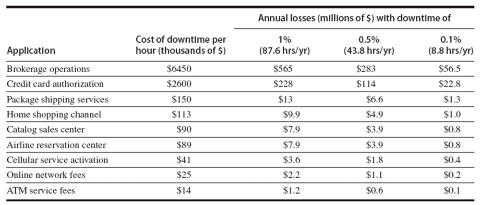
Network servers provide important resources to internal (Intranet) and external (Internet) network users. Since these resources are necessary for businesses to function, server downtime is sometimes not an option. Look at the downtime cost statistics in the image below; you can see why it is justifiable to spend money on redundancies.
Spare Parts/Technician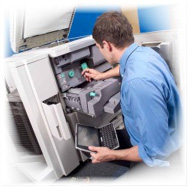
Businesses that are not affected drastically by having their server(s) go down, can withstand the downtime necessary to fix the server by installing spare parts or having a service technician come on site and repair the server.
Server Clusters
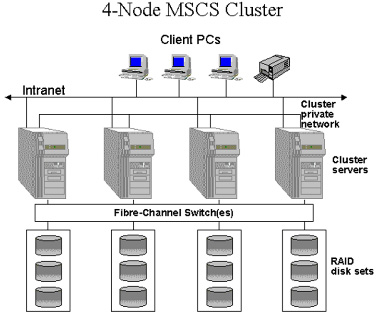
When server downtime creates a less tolerable situation, it may be necessary to incorporate server clusters. This is when spare servers are purchased instead of spare parts. There are two types of server clusters, satisfying two distinct needs: asymmetric server clusters and symmetric server clusters.
Asymmetric Server Cluster
This is when a server is purchased and configured to be just a standby server – to sit on the bench so to speak. This type of server provides no function until the main server goes down.
For asymmetric server clusters to be affective, a redundant server has to be manually kept up-to-date to enable the server to take-off where the old one left off.
Symmetric Server Cluster
This is the preferred method for serious and affective server redundancy. This is where multiple servers work together and share the load of network servicing; while at the same time providing redundancy should one of the servers fail.
Symmetric server clustering is software controlled and is supported by higher end network operating systems such as Windows Server 2012 Datacenter edition.
Redundant Storage
This type of redundancy is commonly implemented in most corporations. This is accomplished by implementing RAID (Redundant Array if Independent Drives) technology. There is both software and hardware controlled RAID and there are different levels of RAID within each. Common RAID levels are RAID 1 (Mirroring) and RAID 5 (Disk striping with distributed parity). In either case if one disk in RAID array fails, the lost data from the failed disk can be recovered instantly without a tape backup and the recovery can be transparent to the user especially if the RAID is controlled by hardware. See images below.
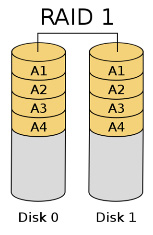
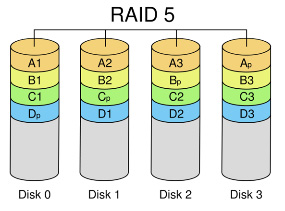
Click on each of the images above to watch how the RAID technology works.
Redundant Network
Access to network resources will likely be available 99% of the time when both server and storage redundancy is implemented. But what if you want 99.9% availability?
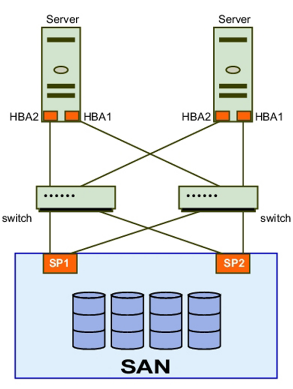
Network redundancy is yet another means by which to improve availability – at a increased cost. This type of redundancy adds additional network devices to the network such as routers, switches and interface cards to provide an automatic network failover should the main network channels falter.
Redundant Power
It is essential that your electronic equipment be provided with clean, continuous power. No power, no business. Most business continuity plans include the use of an uninterruptible power supply (UPS) to maintain electrical power to the main server room. Some organizations critically in need of having 100% power 100% of the time have to incorporate backup generator’s to keep the servers going after a power outage.
There are two types of UPS: off-line UPS and on-line UPS.
Off-line UPS
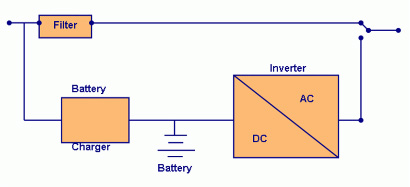
This is the most affordable, and is commonly used for small business/home business installations. The server that is connected to an off-line UPS gets its’ main power from the grid. If the grid goes down, the off-line UPS will immediately switch over to battery power until the power is restored. The battery is kept charged while the grid is up and often provides surge protection during normal operation.
On-line UPS
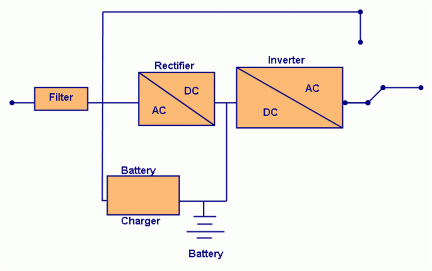
Servers that are connected to an on-line UPS receive their power from the battery. The battery is kept charged from the main power source of the grid. An on-line UPS provides clean, non-fluctuating power to the server by eliminating dips or sags in voltage. It also provides surge protection. If the battery were to ever fail, an on-line UPS will switch to the main source of power from the grid.
Common UPS tasks
If a UPS is the sole power backup device, the server connected to it will eventually have to be shut down because the battery will not last forever. Assuming that the server is the protected device, here are some tasks that are supported by all types of UPS:
- A UPS will inform the server of a power outage.
- All users of the server will be informed that they must logoff.
- New users are prevented from logging on.
- Users are disconnected from the server and the server will be shut down in a set amount of time.
Backup Generators
For the ultimate in protection against power outages, backup generators are necessary. These are powered by gas, diesel, natural gas, or propane gas. Backup generators installed for a business become a permanent structure of the building. They also include automatic transfer switches that switch to the backup generator when the loss of primary power is detected.
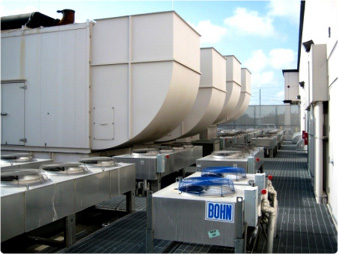
Redundant Sites
Even though you may think you are covered with redundant servers, storage, networks and power you may want that extra level of comfort by having a redundant office or site. The reason for this is to prepare yourself for either a man-made disaster or a natural disaster that may require you to relocate to continue your business.
There are three types of redundant sites: hot sites, cold sites, and warm sites.
Hot Sites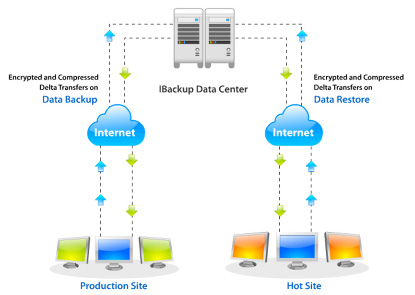
A hot site is a duplicate of the original site of the business, with full computer systems as well as near-complete backups of user data. Following a disaster, the hot site enables business to relocate with minimal losses to normal operations. Ideally, a hot site will be up and running within a matter of hours.
Cold Sites
A cold site provides office space but the customer must provide and install all equipment needed to continue operations.
This type of redundant site is the least expensive, but will require a longer time to get an enterprise in full operation after the disaster.
Warm Sites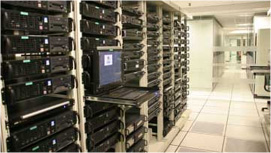
This site has all of the equipment installed, but does not have active Internet or telecommunications facilities, and does not have current backups of data.
The cost is obviously in-between the hot and cold sites and may take a ½ day to make the necessary connections and restore backups.
Disaster Recovery Procedures (DRP)
As we just found out, there are many, very effective techniques and tools to insure business continuity. But what happens when there is a disaster? It is essential that organizations develop a disaster recovery plan so that procedures and processes are designed and tested to restore an organization’s operations following a disaster.
A DRP plan is a written document detailing the procedures necessary to recover from a disaster. Click on the image below and view the common features in DRP plans.

Disaster Exercises
Have you ever been in a fire drill? This is a common exercise that practices and tests DRP procedures that require quick evacuation of a building should there be a fire. If the exercise brings out some flaws in the plan, then the plan would be rewritten. 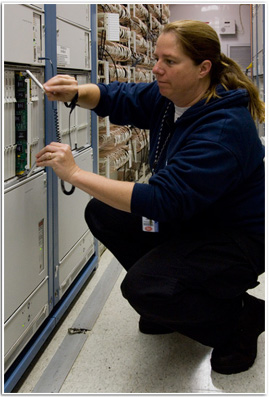 There are numerous technology related disaster exercises that can be performed such as recovering from a failure to a key component of your server or network – such as a disk drive, a mother board, a network interface card, to name just a few.
Enterprise Data Backups
RAID arrays of disks aren’t enough. Organizations must have data backups of all data and operating system files so that they can recover data that may get lost due to a disaster.
We had already discussed the concept of data backup to magnetic tape and other storage devices. Corporations have other options too, such as disk to disk or continuous data protection (CDP).
Disk to Disk (D2D) Backups
Backing up to another disk (such as a large, single disk or a RAID array) is popular because both the backup and the restore process are quick. The only disadvantage to D2D is that if the backup disk is not portable, it cannot be taken off site easily; which is important if there is a complete, natural disaster that destroys everything in the office.
Continuous data protection (CDP)
The CDP method of backup will essentially create versions of files as they get modified. The backup versions are stored in a remote storage location and can easily be restored through a web interface. This method is secure, only the files that you own can be restored by you.
 Topic 6-1: Analyze an enterprise level disaster recovery plan - student led discussion. Please click on the image to the left to view the instructions for this discussion board forum.
Topic 6-2: Analyze the requirements of a personal information technology disaster recovery plan - student led discussion. Please click on the image to the left to view the instructions for this discussion board forum.
Incident Response Procedures
Incident response is a computer science specialty used by law enforcement to respond to an unauthorized incident such as a destructive network attack. This type of event can lead to a disaster recovery response to prosecute the attacker or criminal.
Computer forensics applies to anything that has memory or storage and that can be used as evidence against an attacker.
It is likely (95% chance) that an attacker will leave a trace of evidence that can be detected with a carefully planned forensics investigation. However, this may not be easy and requires a highly trained individual to properly obtain the evidence so that it is not thrown out in court.
Responding to a Computer Forensics Incident
Computer forensics is not unlike a standard forensics investigation. The steps are to:
- Secure the crime scene
- Preserve the evidence
- Establish a chain of custody
- Examine the evidence
Secure the Scene
As soon as a computer is suspected of containing evidence of an attack, the immediate area of the computer is secured for the arrival of a team of investigators.
The investigations team will photograph (using film based photos) all of the devices in question from multiple angles and the cables connected to the computer are labeled.
Finally, interviews are made and documented.
Preserve the Evidence
If the computer that the investigation is being made on is still running, then evidence may be obtained from the computer’s volatile data; this is data that would be lost if the computer is powered down. Volatile data includes currently running applications, network connections, open files, etc.
After the volatile data is obtained, the contents of the disk are copied to a backup device such as another hard drive or a USB hard drive. Since the copy that is made has to be an exact copy, a mirror image backup as to be made (also called a bit-stream backup). This is done by a trained professional so that evidence is not destroyed or altered. Destroyed or altered evidence would quickly be thrown out in the court of law.
Establish the Chain of Custody
Document the what, where, why, who, when type of information regarding the evidence at all times – leaving no gaps.
One example is the recording of the md5 hash of digital evidence (such as the entire disk) before any work is done on it and have this process and information recorded on the chain of custody report with a witness’s signature. Using the original md5 hash, it can be proven at any time whether or not the digital evidence was corrupted.
Examine the Evidence
After the mirrored copy of the hard drive is made, the original computer is simply secured and the hard drive copy is examined (while mounted read only) for  clues that will help trace the dirty deeds done on that computer. Clues include information obtained from undeleted files such as office documents (such as word, spreadsheet, E-mail), web caches and cookies, Windows recycling bin, and frequent E-mail messages.
The disk may also contain useful patterns of evidence that are not exposed and may have to be mined. This process is called forensic data mining. This evidence will be hidden on the disk in places known only by trained forensic personnel. The most prominent place to find such evidence is from the disk locations were recently deleted files once resided. The files will actually still exist unless the disk space is claimed by another file or the unallocated disk space is zeroed (nulled) out.