 Explore mobile device security
Networks
It is important to understand the basic concepts of networks before you can secure a network of mobile devices (a.k.a. a network of wireless devices). This includes the following:
- A conceptual understanding of networks.
- The devices in a network.
- How computers talk to one another in a network.
- The different types of networks.
A conceptual understanding of networks.
A standalone, desktop computer can adequately support all of your needs. However, at times it is necessary to allow other PC users in your home or at work to share system resources. These resources include files, printers, applications and even your Internet connection.
When two or more computers connect to one another they become “networked” together and the resources that they share essentially become network resources. The connection between the computers can be wired or wireless. In a business environment, high performance computers called servers make network resources more secure and available.
The devices in a network.
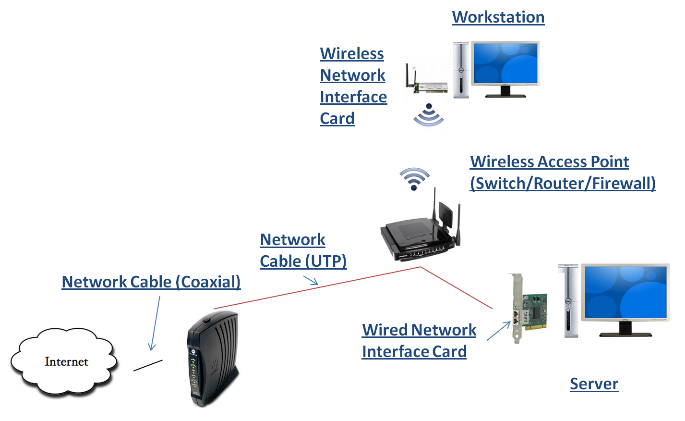
The hardware devices shown in the image below are devices required to construct a network in a small business/home network. Notice that both wired and wireless connections are used. This configuration is an example of both a wireless local area network (WLAN) and a local area network (LAN).
How computers talk to one another in a network.
The devices in the sample network represented in the above image have to communicate with one another to make a network functional. They do this by sending and receiving network packets. For this to happen, each network device has to connect to one another through a network interface adapter, wired or wireless. To further support network functionality, each device has to share a common communication protocol and have unique addresses.
Network Protocols and IP Addressing
TCP/IP is the Internet protocol of choice, it is also the protocol of choice for local area networks (LANs) and wide area networks (WANs). In a LAN, computers communicate at high-speeds and are usually in one building. In a WAN, computers communicate more slowly because they connect over long distances, between buildings, cities or even countries.
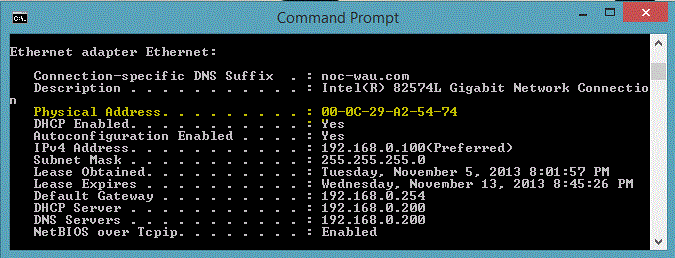
To view your computer's current network connection settings perform the steps shown in the video that you can access by clicking on the image below.
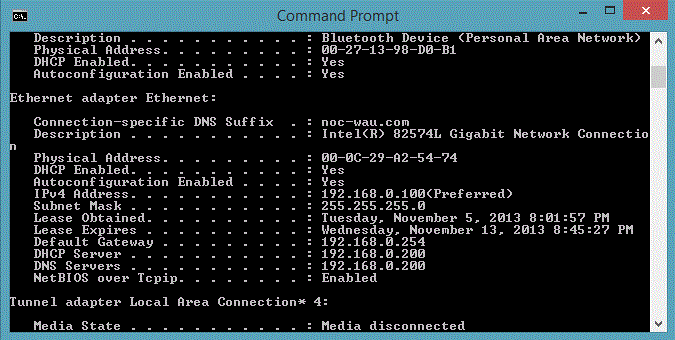
The TCP/IP protocol is actually part of a suite of protocols. The IP protocol within this suite controls the logical addressing of computers by using a unique, Internet Protocol (IP) address that consists of four sets of digits (octets) separated by periods. An example of an IP address can found in the image above next to the IPv4 Address caption.
Where does your address come from?
On a user's computer (i.e. Windows 8.1) within a network you will likely notice that the IP address identifying your computer was obtained dynamically through a DHCP (Dynamic Host Configuration Protocol) server. Computers that obtain IP addresses from DHCP servers “lease” the IP Address. As you can see by the image above, the DHCP Server that leased an IP address to the computer was 192.168.0.200. If this were a wireless device in a home network, the DHCP server would likely be your wireless access point.
What are all those other IP addresses?
You will also notice other IP addresses. Notice the Default Gateway address, this address represents the router device that helps direct network packets out to the Internet or to another part of your internal network. Notice the DNS Servers address, this address represents the network server or device that will resolve domain names (URLs) into IP addresses. In the image above you can see that the default gateway address is also 192.168.0.254 whereby the DNS server is 192.168.0.200.
Gateways and Subnets
As mentioned above, the default gateway is the network router enables network packets to sent to a different network, such as the Internet or another defined network (subnet) in the same building. Networks are classified based on the value of the IP address and the subnet mask (i.e. 255.255.255.0). My address is a private, class C address that my DHCP server assigned dynamically.
Dynamic versus Static Addresses
The IP address of your default gateway is an example of a static (unchanging) IP address. It is set by the administrator at the time the router was configured. It should be static because there are other devices that have to reference this address (as my computer does). Printers, routers and servers are network devices that are configured with static addresses, the DNS server has a static address.
Domain Naming Service (DNS)
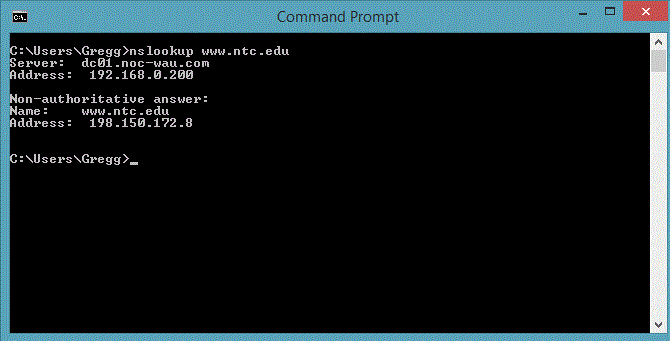
Fortunately, we do not always have to remember IP addresses to communicate with other network devices such as servers or routers. In TCP/IP network installations we only need to remember names of computers thanks to DNS (domain name services), which is also referred to as a Name Server. The purpose of DNS is to resolve names into IP addresses. To see this work type nslookup www.ntc.edu at the command prompt and you will see the IP address that is resolved from the fully qualified domain name (FQDN) of www.ntc.edu. See image below.
What is in a domain name?
So far you have learned that there are fully qualified domain names (FQDN) such as www.ntc.edu and a corresponding IP address for that domain name. Within the FQDN there is a host name (www) and a registered domain name (ntc.edu). The prefix of a FQDN is always the host name, everything after that represents a domain name.

Yet another address
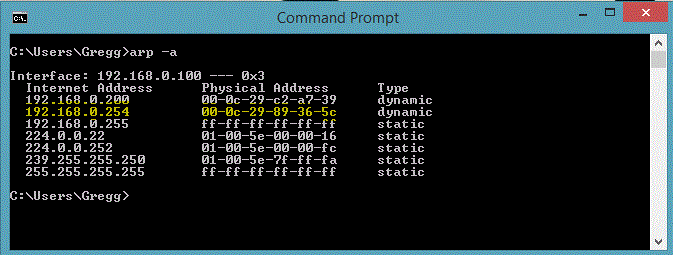
Communication between computers does not end with names and IP addresses. Before network devices can actually send and receive network packets between each other, they have to get to know each other by physical address. Another name for this physical address is Machine Address or Media Access Control (MAC) address. This MAC address is unique for each network device on the network and throughout the world. This address becomes known on your network through another TCP/IP protocol called Address Resolution Protocol (ARP). See image below.
Address Resolution Protocol (ARP).
When a local IP address is used from your computer, the MAC address of this IP address will have to be obtained. ARP will obtain this MAC address by doing a network broadcast (a special network packet that is sent to all computers in the immediate local area network segment) asking who belongs to the given IP address. Once ARP gets a response, it will remember the returned MAC address for a given amount of time to minimize the ARP network broadcasts that are sent. ITo see this at work, perform the NSLookup command shown in the Domain Naming Service (DNS) section shown above and then type arp –a. See image below and notice how the MAC address of my gateway (192.168.0.254) was remembered because the NSLookup network request that I made had to be processed through my Gateway (router) to be sent to the DNS server on the Internet, therefore my computer had to know what the MAC address was of my gateway so that it could "talk" to it.
The different types of networks
There are two basic types of network architecture that are commonly used: Peer-to-Peer and Client-Server.
Peer-to-Peer
A Peer-to-Peer network is shown in the image below.
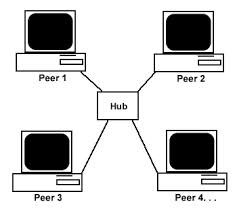
In this type of network a central server type device does not exist. All devices are somewhat equal have each device can share network resources with one another such as files and printers. Authorization to access each resources is controlled on the individual devices where the resource resides; this may require the users on a peer-to-peer network to login multiple times to access the resources being offered by the peers in this network. This type of network is common for home users are small business networks.
Client-Server
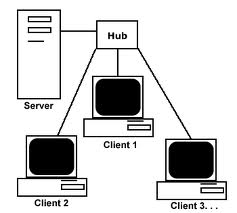
In this type of network the server becomes the sole resource sharing device in the network. It also serves to provide centralized control of resource security, thus allowing for a single sign-on network. This type of network is favored by most businesses.