 Explore mobile device security
Defenses
There are two major areas of concern
that people must address with regards to implementing
wireless network defenses and these are:
1.
Securing a home/small
business wireless network.
2.
Being secure in a public
wireless network.
Securing a home / small business wireless network.
Securing a home wireless network is
easy.
These are the steps necessary for security to be
implemented: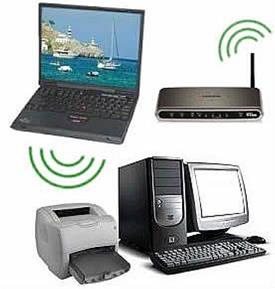
1.
Lock down your wireless router.
2.
Limit users.
3.
Turn-on Wi-Fi Protected Access 2 (WPA2).
4.
Configure Network Settings.
Lock down your wireless router – step 1
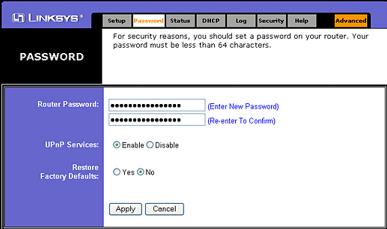
Your first task to better secure
your wireless router is to change the factory default
user name and password. The default user name and password
for your wireless router are known publicly, so don’t
leave it as default setting.
Here are some known user names and
passwords:
Default
User name
Password
Linksys
(blank)
admin
Dlink
admin
(blank)
Netgear
admin
password
Lock down your wireless router – step 2
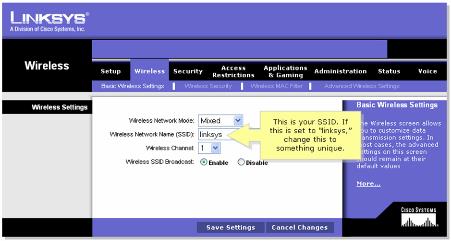
Change factory default SSID on the
wireless router to an SSID that would not reveal the
source of the wireless access point.
Like with the user name and
password, default SSIDs are known publicly.
Here are some examples of default SSID of
wireless routers from different vendors:
Default
SSID
Linksys
linksys
Dlink
default
Netgear
NETGEAR
Lock down your wireless router – step 3
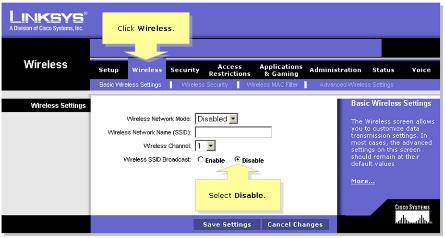
Disable SSID Broadcast. By default, most wireless router will broadcast the SSID to all wireless devices. That means your neighbor can detect the SSID you use in your network and gain access to your network with a computer equipped with wireless network adapter.
Limit Users – step 1
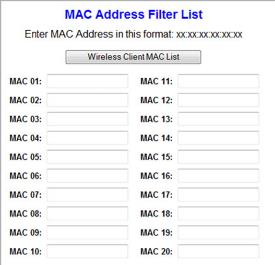
You can enable Media Access Control
(MAC) address filtering to allow the computers with
specific MAC addresses (the wireless adapter's MAC
address) to join the wireless network. This is one of
the methods to enhance wireless network security from
unauthorized access.
In order to make it work, you need
to define a list of MAC addresses that are allowed to
join the network.

Limit Users – step 2
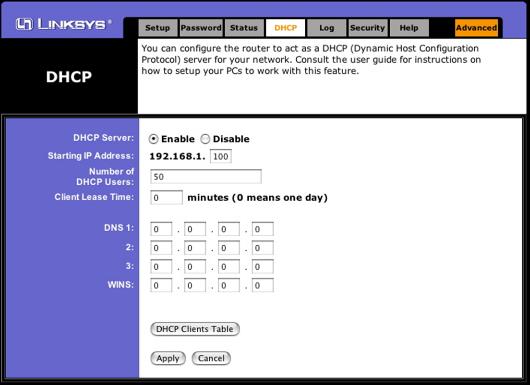
You can also limit the number of IP
addresses that are given out to connecting wireless
clients by limiting the number of DHCP leases that are
given out.
If an IP address cannot be given to a client,
they simply cannot connect.
Turn-on Wi-Fi Protected
Access 2 (WPA2) – step 1
The standard for encrypting that is
used by wireless routers and wireless devices today is
known as the personal security model.
There are two parts:
Wi-Fi Protected Access (WPA) and Wi-Fi Protected
Access 2 (WPA2).
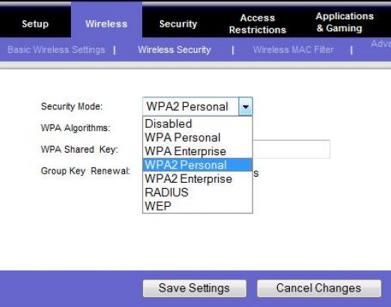
The first step in configuring WPA2
is to select WPA2 Personal.
Turn-on Wi-Fi Protected
Access 2 (WPA2) – step 2
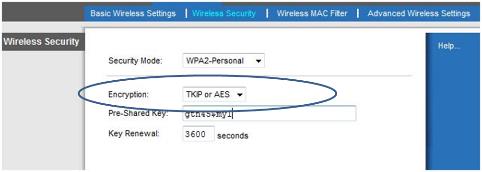
The next step is to set the
encryption level.
TCIP or AES is usually chosen; AES is the most secure.
This allows both WPA and WPA2 clients to connect.
Configure Network Settings -
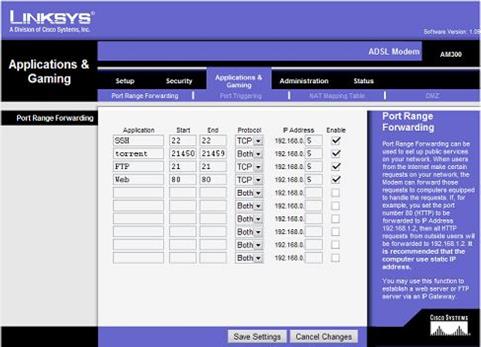
Port Forwarding
When Demilitarized Zones (DMZs) are
enabled on wireless routers, all ports are opened to a
given computer for access from the Internet.
A better alternative is to enable port
forwarding.
This method enables only the ports that are needed such
as HTTP or FTP.
Being Secure in a Public Wireless Network
Whenever you are on a public
network you have to protect yourself and use the
network cautiously and securely.
The two most common means to protect yourself
is with a personal firewall and a virtual private
network (VPN).
Personal Firewall
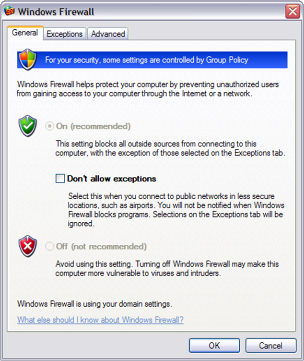
An essential safety control,
the personal firewall should always be enabled when
accessing a public network.
The personal firewall is software based and
runs in the operating system.
It is rule based and controls incoming (and
outgoing on some personal firewalls) traffic based
on the following rules:
Allow -
let the packet pass through and continue its journey
to the destination computer.
Block –
prevents the packet from passing through to the
network by dropping it.
Prompt -
asks the user to decide whether to allow or block
the packet.
Personal Firewall –
Stateless vs. Stateful filtering
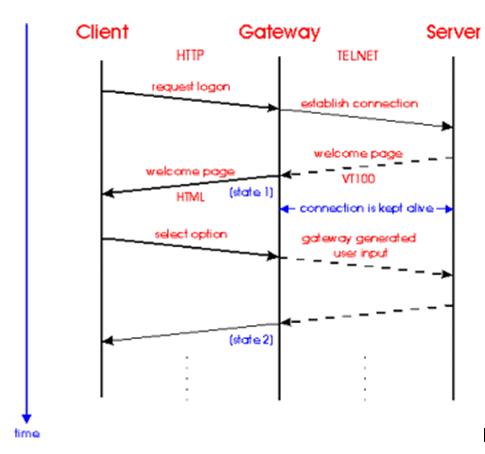
With stateless filtering,
packets are allowed or denied based solely on the
rule (allowed, denied or prompted).
This is not the best security because an
attacker can get through a firewall by changing a
packet to look like a packet that is allowed (i.e.
making it an HTTP packet).
Stateful filtering is also rule
based, but also includes a filtering decision based
on whether the user made the request for the packet
or not.
This way, if a packet is destined to a computer from
an attacker, the filter will recognize that the
packet is not being sent in response to a legitimate
request and block the attack.
Virtual Private
Networks
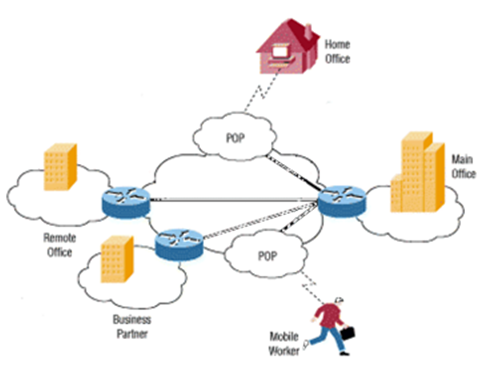
When you need to communicate
with a corporate server over a public network like
the Internet, it is a common practice to conduct
your transactions through a virtual private network
“tunnel”.
The tunnel is a term used to indicate that
the data sent and received through the VPN
connection is encrypted and thus indecipherable.
When a VPN tunnel is established, the
connection between the user and the server is
transparent, secure, requires authentication, and
appears to function like a real local area network.
Other Best Practices
 Topic 5-3: Discuss wireless best practices -
Student led discussion. Click on the image to the left to get more information pertaining to this discussion.
Topic 5-3: Discuss wireless best practices -
Student led discussion. Click on the image to the left to get more information pertaining to this discussion.