 Explore common breaches and defenses of Internet security
Attacks
When you surf the Internet you are always at risk. There are things that can attack you that you would never dream of such as:
- Good looking, dynamic code that may be nice to look at but may also spread a virus that is resistant to antibiotics (Mobile code).
- Privacy attacks that make you crumble (Cookies).
- Bogus security (Corrupt Digital certificates).
- Downloads that happen automatically (Drive-by downloads)
- Links that take you down the wrong path like a faulty GPS (Redirecting Web Traffic)
- E-mail attacks.
Mobile Code
Users of the Web demand an interface that changes based on certain events such as who the user is, the time of day, or what they click on.
This type of content is dynamic and cannot be created using static HTML code. Whenever dynamic code is introduced to a Web page, the browser has to obtain the code and process it.
The most common examples of downloaded browser code are JavaScript, Java, and ActiveX.
JavaScript
JavaScript cannot create a standalone program like C++ or Visual Basic. It is only meant to live in HTML code and be interpreted into a recognizable language by your browser.
JavaScript, by design, is not allowed to read, write, create, delete or list the files on the computer that runs the JavaScript. This is meant to prevent serious harm.

JavaScript can be a created with the sole goal of getting information from a user such as a password, an e-mail, a credit card number, or an annoying prompt that never goes away.
Click on the image below to see for yourself - if you dare!

Java
Java is a complete programming language and it creates applications. When Java is included in HTML, it is referred to as a Java applet, much in the same way an image is included in a page.
When you use a Java technology-enabled browser to view a page that contains an applet, the applet's code is transferred to your system and executed by the browser's Java Virtual Machine (JVM).
Java applets can be trusted (signed) or not trusted (unsigned). Those applets that are unsigned run in a sandbox to fence them away from the resources on your computer. Sandboxing a Java applet is not always 100% effective, however.
Click on the image below to get more information.

ActiveX
There is no scripting or programming involved with ActiveX because ActiveX are just controls (or add-ons). These controls can be activated through the use of a scripting language or by using HTML code.
ActiveX controls work similar to a Java applet and can perform many of the same functions; however, ActiveX controls do not run in a sandbox.
Click on the image below to get more information.

ActiveX has risk. To minimize this risk, browsers register and authenticate ActiveX controls before downloading them. ActiveX controls can be signed or unsigned. Being signed does not guarantee trust, however.
Cookies
Cookies are small files that are stored on a user’s hard drive that contain information about a user's preferences to a particular Web site. When  these cookies are used by the Web site that created the cookies, these cookies are called 1st party cookies.
When these cookies are used by a Web site other than what they are intended to be used for, the cookie is called a 3rd party cookie and could be an invasion of the user's privacy, such as with web site tracking. There is also a cookie called a flash cookie (named after Adobe Flash) that can take up large amounts of disk space, reside in multiple locations on your disk and have the power to "keep alive" regular cookies.
Corrupt Digital Certificates
 Topic 4-1: Research and then post one recent incident of an attack using fraudulent digital certificate - student led discussion. Click on the image to the left to view the instructions for this discussion.
Drive-by Downloads
Unfortunately, the "waters" of the Internet cannot be considered safe if all you do is passively search and do not interact with a Web site.
Just by going to a Web site you could be attacked and eaten. Swim at your own risk.
Well known sites, as well as run-of-the-mill sites, are increasingly being compromised with code (such as JavaScript) that could exploit a vulnerability in your browser and in-turn download malicious software from the attacker’s computer to your computer - perhaps making your computer a bot in a botnet.
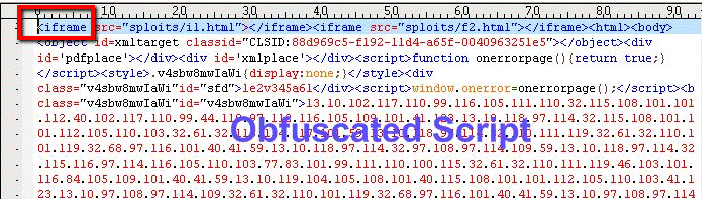
This can be done without you knowing it through an invisible HTML Web page (an iFrame or Inline Frame) embedded in the Web page you are viewing.
See image below for an example of iFrame HTML code.
Ironically, while researching (Google searching) this segment, I encountered numerous attacks. Fortunately, my anti-virus software stopped the attacks. See image below.
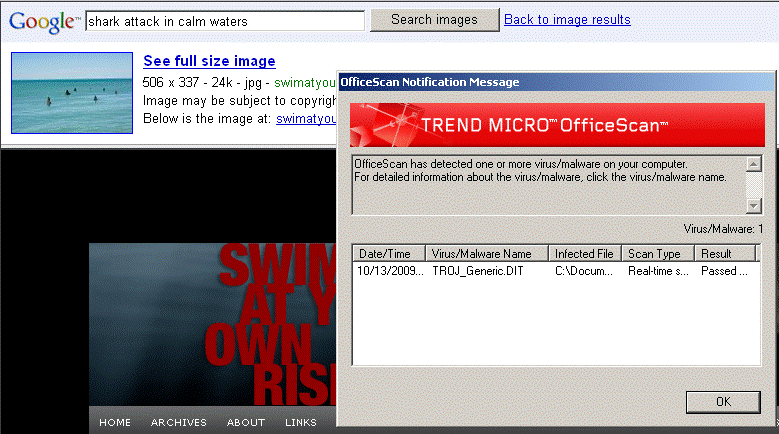
Warning: please do not search for the images associated with “shark attack in calm waters”, unless you know you have really good anti-virus software.
Redirecting Web Traffic
Most of the web traffic redirection comes from user's mistyping a URL or typing a URL that they think is the appropriate Web site.
For example, if you type http://www.fedora.org thinking that you are going to the Fedora Linux Web site, you are wrong. Fortunately, this site is not malicious, at least not to me.
If the folks that owned this Web site changed it to look like the actual Fedora Web site, they could potentially cause you harm.
E-Mail Attacks
One of the more common means of distributing attacks is through e-mail. These include sending spam, malicious attachments, and embedded hyperlinks.
Spam
If you are a frequent e-mail user, you've likely experienced the problem of spam cluttering your inbox. These unwanted mass mailings are usually sales pitches, money making schemes or special offers.
According to Nucleus Research, Spam can cost corporations an estimated $874.00 per person in loss of productivity.
You certainly can get rid of spam e-mail by deleting it, but most people would rather not see it - never, ever.
You can unsubscribe to some spam, but most spam you have to filter, either thru the e-mail server or thru your e-mail client application.
Click on the image below to view a demo from spam bully.

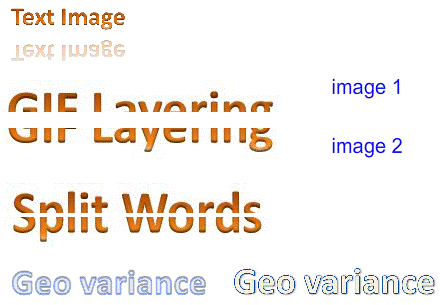
Spam filtering is becoming difficult to manage because spammers use very clever ways to camouflage their spam.
To hide the content, they can put text in an image and they can vary the images by using layering, splitting and geometric variances. See the examples in the images below.
Malicious attachments
Attachments are files that are sent along with your e-mail and are "attached" to your e-mail. These files could contain malicious code and likely to spread to other e-mail users in your e-mail address book if you open it, thus creating a distributed attack.
The trick to getting the user to open such a file is to make them believe that the source of the e-mail is someone they can trust - like a friend or co-worker.
Imbedded hyperlinks
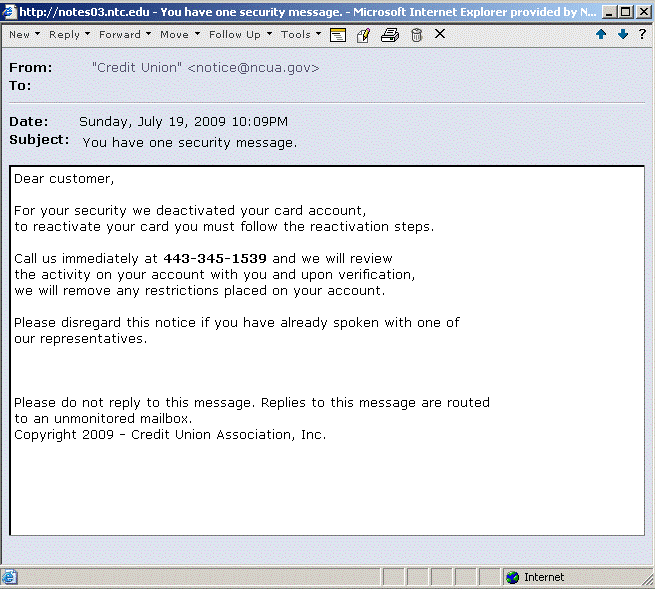
Have you ever gotten an e-mail from PayPal, Bank One, or Visa saying that your account has been tampered with and then asking you to click on the link inside the e-mail wanting you to confirm your account information - like the one in the image below?
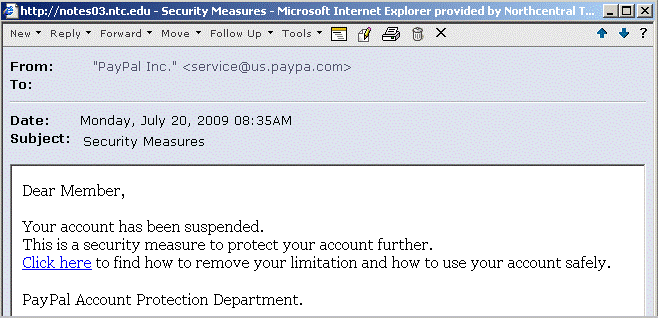
DO NOT OPEN THESE EMAILS! MOST COMPANIES SUCH AS PAYPAL, BANK ONE, ETC. DO NOT SEND EMAILS TO THEIR CUSTOMERS. IT IS VERY EASY TO SEND AN EMAIL WITH A FAKE “FROM”.
How about just plain old phone scams via. e-mail? See image below.