 Explore common attacks directed at users and their personal security
Defenses
Password Management
Strong passwords are a must!
Our passwords are the keys you use to access personal information that you’ve stored on your computer and in your online accounts. In today’s online world, having a strong password is a must. However, the problem with strong passwords is that they can be difficult to remember.
Your password is your first defense against an attacker – which could be the person right next to you.
Here are some tips to making a password strong:
- Combine letters, numbers, and symbols. Make it hard to guess.
- Use words and phrases (pass phrases). These are easy to remember, difficult for others to guess. If you system does not allow pass phrases (because of an administrator controlled security policy), convert it to a password. For example, the phrase "I like to eat fish on Friday" could be made into the following password "Iltefof".
- Use Symbols against words like:
- Replace any ‘a’ with @
- Replace any ’s’ with $
- Replace spaces with the percent symbol (%)
- Replace any ‘o’ with 0 (zero)
- Replace any ‘i’ with !
- Replace any ‘c’ with
- (Note: some passwords do not allow symbols, but this does not mean you still cannot use the key that the symbol is on (i.e. #4 key has the $ symbol).
- Avoid sequences or repeated characters such as “12345678,” “222222,” “abcdefg,” or adjacent letters on your keyboard.
- Avoid using your login name as a password. Any part of your name, birthday, social security number, or names of your loved ones constitutes a bad password choice.
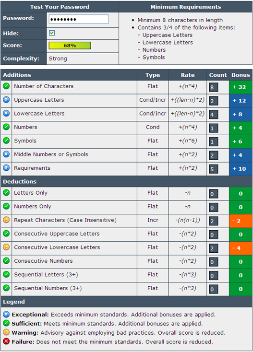
- Use a Password Meter, it can test your existing password for strength but also provides guidelines for creating stronger passwords. For example, the “P@ssw0rd” password is rated strong, see image below.
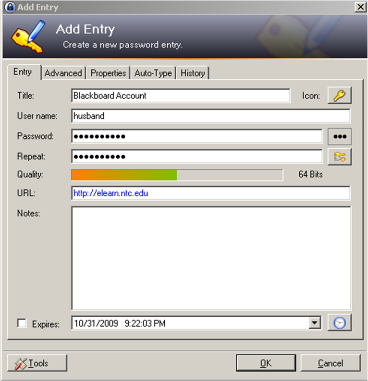
- Use a password storage program that will allow you to use very complex passwords for multiple online username/password combinations. You just need to define the username, password and the URL requiring the password. You will need to use a master password to access the database, and then it is just a matter of drag and drop into the login form. Password storage programs of course can still be used with simple passwords. See image below for an example of such a program.
Recognizing Phishing Attacks
Don't be tricked
Phishing is just social engineering. To combat phishing tricks you must learn to recognize them.
Click on the links below to get more information.
https://www.barkly.com/how-to-recognize-and-prevent-phishing-attacks
https://www.csoonline.com/article/3172711/phishing/5-ways-to-spot-a-phishing-email.html
Enable Smartscreen
Make sure you have the Smartscreen filter enabled if you browser supports it.
Click Tools, select Internet Options, select Advanced. Scroll down to Security and then click the Enable SmartScreen Filter check box to place a check mark by the box if necessary. See image below.
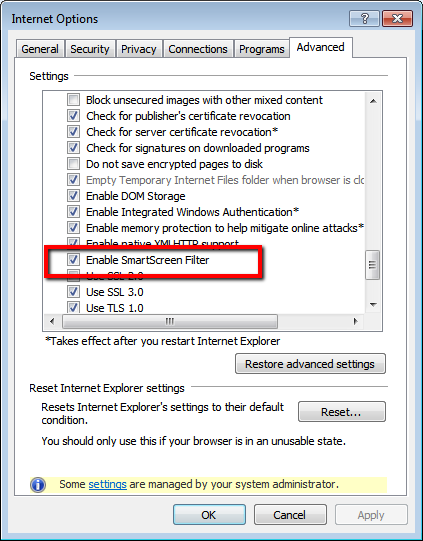
This will essentially flag you when you are on a site that is known to be a phishing site.
Avoiding Identity Theft
Fight back against identity theft.
Take the time and read what the Federal Trade Commission has to say about identity theft – Deter, Detect and Defend.
Click on the image below to get more information about deter, detect and defend.

Get a Credit Report
The Fair and Accurate Credit Transaction Act (FACTA) of 2003 contains rules regarding consumer privacy. With this act you have the right to request one free credit report from each of the three national credit-reporting firms every 12 months (or 1 every 4 months).
If you find a problem, then you would need to mail a letter to the credit reporting agency (listed below) for a resolution that may eventually include all of the credit reporting agencies.
Equifax
P.O. Box 740256
Atlanta, Georgia 30374
Experian
P.O. Box 9554
Allen, Texas 75013
TransUnion
P.O. Box 6790
Fullerton, CA 92834

Setting Social Networking Defenses
 Discuss social networking defenses - student led discussion. Click on the image to the left to view the instructions.