 Getting Started with POIS
Blackboard Navigation Basics
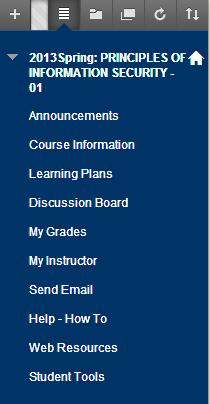 Once you have the class open for the first timeb in Blackboard, learn how to navigate the class within Blackboard. The descriptions below will help you in this matter and will define the main functions listed in the class’s navigation panel as shown in the image on the left.
The Announcements page will always be the first to display when you open the class and can always be redisplayed by clicking on the Announcements button. Always view any new announcements that I give you, they are generally very important.
As all good students do, please read the class Syllabus that you will find in the Course Information section. This is also where you will find a copy of the Welcome letter.
The Learning Plans button will take you to the “Mission Plan” assignment folders. When this class was first rewritten in the fall of 2009 it took on the Mission Impossible theme - not to say that implementing security is impossible, but it certainly is a mission. Each mission plan relates to a chapter in your book, accept for mission plan 0, which is basically a “getting started with POIS” mission plan. Each mission plan folder will have very specific instructions that you must follow.
The Discussion Board button will actually take you to the class discussion board that we will use periodically throughout the course.
Within the My Grades section you will be able to view the grades that you will be given throughout the course. Grades will be updated weekly on Friday - Sunday.
The My Instructor button will give you information about me and how I can be contacted. When a contact is made to me, a reply will be forthcoming within 24 hours.
The Send E-Mail link will take you to an interface that will allow you to send an email to your class comrades as well as to your instructor.
If you are new to blackboard, check out the help information within the Help – How To section.
The Web Resources button will display any Internet links that I feel will be helpful for the class. Currently, you will find the links that will give you access to the web sites necessary for you to obtain Microsoft and VMware product codes and software, which will be required for this class.
The Student Tools button will give you access to numerous tools that will be helpful for the class; check it out.